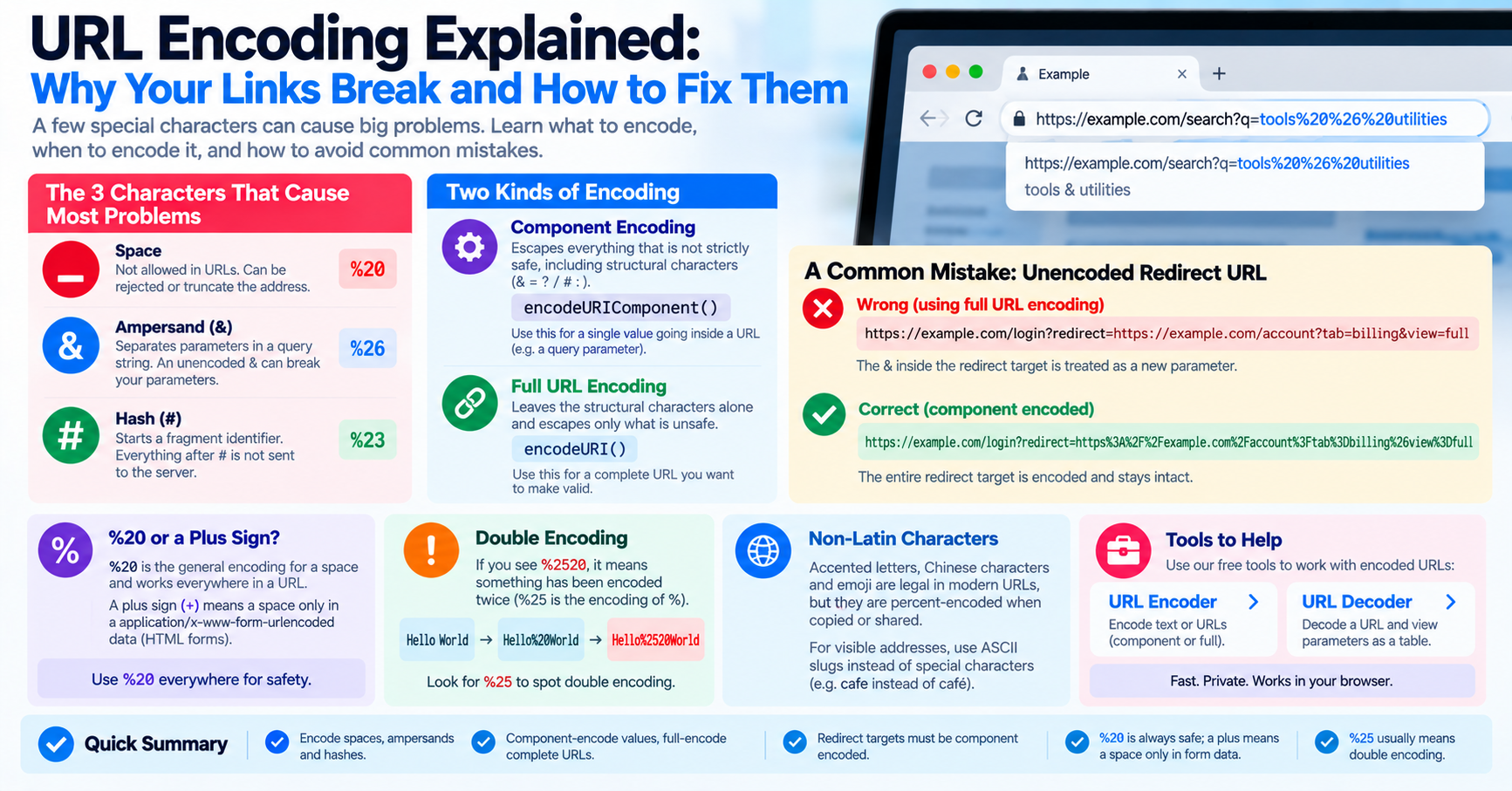
If you have ever built a web application, integrated an API webhook, or shared a link containing special characters over email, you have likely encountered broken links. A user searches for "C++ & C#", and your backend server receives only "C ". A password reset link containing an ampersand fails to validate. Or a redirect URL arrives in an error log displaying corrupted characters like %2520. What causes these URL failures, and why is encoding text into URLs so surprisingly intricate?
The web was built on foundational protocols designed over three decades ago. To ensure that links travel safely across different operating systems, proxies, and network routers, web standards mandate strict rules regarding which characters are permitted inside a uniform resource locator (URL). Understanding percent-encoding (standardized in RFC 3986) is fundamental to designing robust full-stack software.
The Anatomy of RFC 3986: Reserved vs. Unreserved Characters
A URL is not just an arbitrary text string; it is a structured address composed of protocol, host, port, path, query string, and fragment identifier components. Because specific characters act as syntactical delimiters between these components, RFC 3986 partitions all ASCII characters into two distinct categories:
| Character Set | Included Characters | Syntactical Role in URLs | Encoding Requirement |
|---|---|---|---|
| Unreserved | A-Z, a-z, 0-9, -, _, ., ~ |
Guaranteed safe across all network layers. | Never encoded under RFC 3986. |
| Gen-Delims (General) | :, /, ?, #, [, ], @ |
Separate major URI structural components (path, query, fragment). | Must be percent-encoded if used as literal data inside parameters. |
| Sub-Delims (Subcomponents) | !, $, &, ', (, ), *, +, ,, ;, = |
Delimit key-value pairs (& and =) inside query strings. |
Must be encoded when appearing inside parameter values. |
The Mathematics of Percent-Encoding
When a character requires encoding, it is converted into its underlying byte value in binary, and that byte is written as a percent sign (%) followed by a two-character hexadecimal number. For example:
- The space character in standard ASCII is 32 in decimal, which is
0x20in hex:%20. - The ampersand character (
&) has an ASCII hex value of0x26:%26. - The question mark (
?) has an ASCII hex value of0x3F:%3F.
For international characters outside basic 7-bit ASCII, the text is first converted into its multi-byte UTF-8 byte sequence, and each byte is encoded as an individual percent triplet. For instance, the accented letter é is encoded in UTF-8 as two bytes: 0xC3 0xA9. In a URL, it is represented as %C3%A9.
The Plus Sign (+) vs. %20 Confusion
One of the most persistent sources of confusion in web engineering is why spaces are sometimes encoded as + and other times as %20:
application/x-www-form-urlencoded(Legacy Form Postings): In the early HTML specification for form submissions, spaces were designated to be replaced by plus signs (+). Web backends (such as PHP's$_GETor Python'surllib.parse.parse_qs) adhere to this legacy rule, automatically replacing every+with a space during parameter parsing.- RFC 3986 (Modern URI Standard): Under modern URI architecture, the plus sign is a reserved sub-delimiter character. A space must always be percent-encoded as
%20. If you pass a literal plus sign (such as a phone number+15551234567) into a URL query parameter without encoding it (%2B15551234567), the receiving backend server will decode the plus into a space:" 15551234567", corrupting the phone number!
The Double-Encoding Disaster (%2520)
In distributed microservices pipelines, a frequent bug is double-encoding. Consider this scenario:
- A frontend JavaScript client encodes a search term:
encodeURIComponent("blue jeans")->"blue%20jeans". - The client sends this to an API Gateway proxy service.
- The proxy service carelessly passes the entire query string through another encoding filter before forwarding it to the backend microservice. The encoder sees the percent sign (
%) and encodes it to%25, producing:"blue%2520jeans". - When the destination microservice decodes the parameter once, the user receives search results for the literal string
"blue%20jeans"rather than"blue jeans"!
To avoid double-encoding bugs, establish an architectural rule: encode data exactly once at the network edge, and decode parameters exactly once upon receipt.
Unicode Normalization Traps: NFC vs. NFD on macOS
A subtle bug in URL processing occurs when handling international characters across different operating systems. In Unicode, accented characters can be represented in two valid ways:
- Normalization Form C (NFC): Pre-composed character (e.g.
éas a single code pointU+00E9, encoded as%C3%A9). Standard on Linux and Windows. - Normalization Form D (NFD): Decomposed character (e.g. the base letter
eU+0065followed by combining acute accentU+0301, encoded ase%CC%81). Standard on Apple macOS filesystems (HFS+ / APFS).
If an author uploads an image named café.jpg from a Mac, the server filesystem may store it in NFD form. If a Linux web server looks for the file using standard NFC URL requests, the lookup returns a 404 Not Found error! Always normalize URL strings using string.normalize('NFC') before percent-encoding.
OAuth and Webhook Signatures: The Byte-Level Sorting Requirement
In high-security API integrations, such as OAuth 1.0a (RFC 5849) or AWS Signature Version 4 (SigV4), URL encoding is not merely an aesthetic concern—it is a cryptographic prerequisite. When an API client signs an HTTP request, it constructs a canonical request string by percent-encoding every query parameter key and value, sorting them lexicographically by byte order, and hashing the resulting string with HMAC-SHA256.
If an intermediate reverse proxy or routing middleware modifies the query string—for instance, by converting %20 into a plus sign (+), changing uppercase hex triplets like %3A into lowercase %3a, or altering parameter order—the canonical string changes completely. The backend signature verification algorithm computes a completely different SHA-256 hash, and the API request is rejected immediately with HTTP 403 Forbidden: SignatureDoesNotMatch. When authoring API clients, always adhere strictly to RFC 3986 with uppercase hexadecimal digits.
Real-World Troubleshooting in Nginx, Apache, and Reverse Proxies
A frequent source of critical production vulnerabilities and 404 errors lies in how web servers handle percent-encoded paths. In Nginx, the standard internal variable $uri automatically decodes percent-encoded characters before evaluating location blocks and routing rules. For instance, if an incoming request contains /documents%2fsecret.pdf, Nginx's $uri decodes %2f into a literal forward slash: /documents/secret.pdf.
If your Nginx server block proxies requests to an upstream application server using proxy_pass http://backend$uri;, Nginx forwards the pre-decoded URL. This can lead to serious directory traversal attacks or unexpected routing failures. The production-safe configuration pattern is to forward the raw, un-decoded client URI using the $request_uri variable:
# Vulnerable to path decoding mismatches:
# proxy_pass http://upstream_service$uri;

# Production Safe: Passes raw percent-encoded URI intact to backend:
location /api/ {
    proxy_pass http://upstream_service;
    # Or preserve raw query parameters:
    proxy_set_header X-Original-URI $request_uri;
}
Developer Best Practices: Using the Right Encoding Functions
When working in JavaScript, always use encodeURIComponent() for parameter keys and values, and reserve encodeURI() strictly for complete URLs where protocol slashes and query boundaries must be preserved. For batch testing, troubleshooting web server logs, or decoding nested redirect URLs, use our free online URL Encoder and URL Decoder tools.