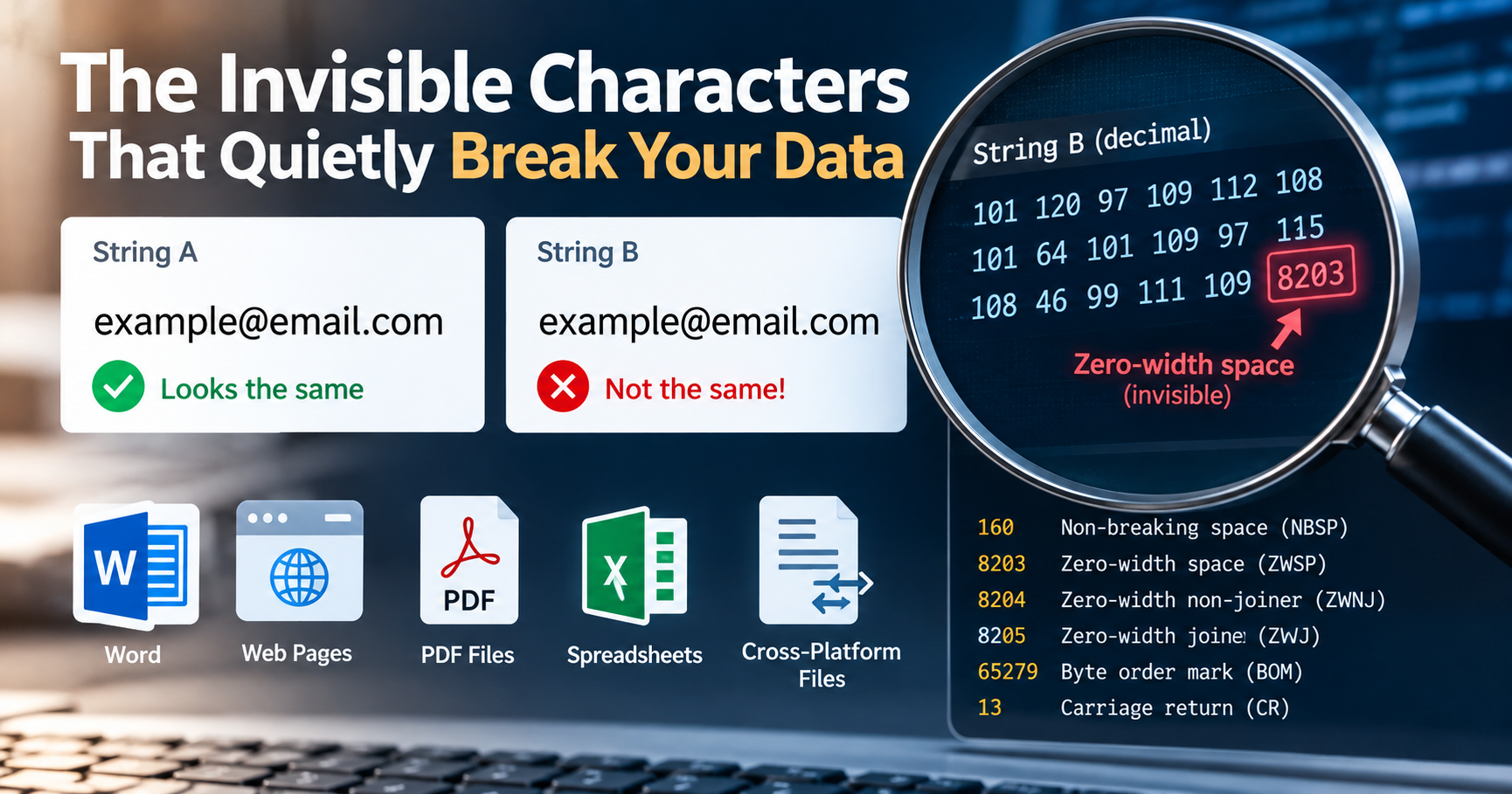
There is a specific category of software defect that can consume an entire engineering afternoon while leaving behind no obvious trace in standard application error logs. Two strings appear completely indistinguishable on your high-resolution monitor. You copy both values into a plain text editor, compare them character by character, and confirm that both visually read "admin". Yet your automated test suite fails, your relational database query returns zero matching records, or your nightly CSV import pipeline crashes on row 142 with an unhandled unique constraint violation. You stare at your terminal in disbelief: the strict equality expression "admin" === "admin" evaluates to false.
The strings are not identical. Lurking within one of those strings is a non-printing Unicode character—a byte sequence with no visible typographical glyph representation. Until you inspect the underlying byte stream, these invisible characters will quietly evade visual detection, skew financial analytics, break security authentication mechanisms, and corrupt production databases.
The Six Most Common Culprits in Production Data
Over fifteen years of debugging web services and distributed data pipelines, I have encountered six invisible characters responsible for virtually all string corruption defects:
| Character Name | Unicode Code Point | UTF-8 Byte Sequence (Hex) | Common Origin & Typical Damage |
|---|---|---|---|
| Zero-Width Space (ZWSP) | U+200B |
0xE2 0x80 0x8B |
Rich-text copy/paste from CMS editors or messaging apps. Splits keywords silently and breaks database lookups. |
| Byte Order Mark (BOM) | U+FEFF |
0xEF 0xBB 0xBF |
Excel and Windows Notepad saving CSVs as "UTF-8 with BOM". Corrupts the very first column header name in JSON and CSV parsers. |
| Non-Breaking Space (NBSP) | U+00A0 |
0xC2 0xA0 |
Web scraping raw HTML where was rendered. Bypasses standard \s regex and basic trim filters. |
| Zero-Width Non-Joiner (ZWNJ) | U+200C |
0xE2 0x80 0x8C |
Complex typography in Persian, Arabic, and Indic scripts. Prevents letters from connecting ligatures. |
| Carriage Return (CR) | U+000D |
0x0D |
Windows CRLF line endings (\r\n). When split on Unix \n, the lingering \r hides at the end of strings, breaking URLs and JSON serialization. |
| Soft Hyphen (SHY) | U+00AD |
0xC2 0xAD |
Used in web layout typography to indicate optional hyphenation points. Invisible until a word wraps at a line break. |
How the Byte Order Mark (BOM) Breaks First Column Headers
One of the classic real-world scenarios occurs when a finance team prepares a customer balance sheet in Microsoft Excel and exports it as a CSV. When Excel exports UTF-8 files, it automatically prefixes the file with a 3-byte Byte Order Mark: 0xEF 0xBB 0xBF. To human eyes opening the CSV in a text editor, line 1 reads perfectly:
id,customer_name,balance_dueHowever, when your automated Python or Node.js backend processes this file and parses the headers into an object dictionary, the first key is not "id". The actual key is "\ufeffid". When your script executes row["id"], your program crashes with a fatal KeyError: 'id'. The developer checks the file, sees id with their own eyes, and wastes two hours suspecting library bugs before discovering the 3 invisible BOM bytes at the start of the file.
Terminal and CLI Diagnostics: Unmasking the Bytes
When you suspect that an invisible character is corrupting your string, visual editors are useless. You must inspect the raw hexadecimal byte stream using command-line diagnostic tools:
1. Linux / macOS Bash: Using xxd and hexdump
# Inspect raw byte sequences with side-by-side ASCII mapping:
echo -n "admin" | xxd -g 1
# Output:
# 00000000: 61 64 6d 69 6e e2 80 8b admin...Notice the output: after the standard ASCII bytes for admin (61 64 6d 69 6e), three unexpected bytes appear: e2 80 8b. That is the exact signature of a Zero-Width Space (U+200B). If you had relied on standard cat or echo, the string would have looked identical to normal text.
2. Python Diagnostic Script
In Python 3, you can inspect each character's exact Unicode code point and formal Unicode name:
import unicodedata

def diagnose_string(s: str):
    print(f"Total Characters: {len(s)}")
    print(f"Total Bytes (UTF-8): {len(s.encode('utf-8'))}")
    for idx, char in enumerate(s):
        code_point = f"U+{ord(char):04X}"
        name = unicodedata.name(char, "UNKNOWN NON-PRINTING")
        print(f"[{idx}] Char: '{char}' | Code: {code_point} | Name: {name}")

# Test with a suspected string:
diagnose_string("admin\u200b")
Security Danger: Zero-Width Characters in Phishing and Obfuscation
Invisible characters are not merely annoying bugs; they are frequently leveraged by threat actors in targeted social engineering and phishing attacks. In modern web environments, attackers insert zero-width spaces into malicious URLs or spoofed usernames:
- Username Impersonation: An attacker creates a user profile named
"admin\u200B". To other users in a support chat or Slack channel, the username appears as"admin", allowing the attacker to impersonate staff members without violating the system's unique username database constraint. - WAF and Filter Evasion: Malicious SQL injection or XSS payloads can be split with zero-width characters (e.g.
SEL\u200BECT). If the web application firewall (WAF) inspects literal strings, it misses the attack. However, if the downstream backend parser normalizes or concatenates the characters, the exploit executes successfully. - Hidden Watermarking (Data Exfiltration): Disgruntled insiders or rogue employees can encode employee ID numbers as binary sequences of zero-width spaces and zero-width non-joiners embedded within confidential text documents. When leaked, the original leaker can be forensically identified by decoding the hidden zero-width sequence.
Production Sanitization: How to Strip Invisible Characters Cleanly
Fixing invisible character corruption requires proactive sanitization at your application's input boundary (before storing data in relational databases or triggering API calls):
PHP Sanitization Pipeline
function sanitizeUnicodeString(string $input): string {
    // 1. Strip UTF-8 Byte Order Mark (BOM)
    $clean = preg_replace('/^\xEF\xBB\xBF/', '', $input);

    // 2. Convert Non-Breaking Spaces (U+00A0) to standard ASCII spaces
    $clean = str_replace("\xC2\xA0", ' ', $clean);

    // 3. Remove Zero-Width Spaces, Non-Joiners, and Joiners (U+200B to U+200D, U+FEFF)
    $clean = preg_replace('/[\x{200B}-\x{200D}\x{FEFF}\x{00AD}]/u', '', $clean);

    // 4. Normalize Windows CRLF line endings to clean Unix LF
    $clean = str_replace(["\r\n", "\r"], "\n", $clean);

    return trim($clean);
}
JavaScript / Node.js Sanitization
function cleanInvisibleChars(str) {
  return str
    // Strip BOM
    .replace(/^\uFEFF/, '')
    // Replace non-breaking spaces with standard space
    .replace(/\u00A0/g, ' ')
    // Strip Zero-Width Spaces, ZWNJ, ZWJ, Soft Hyphens
    .replace(/[\u200B-\u200D\uFEFF\u00AD]/g, '')
    // Normalize CRLF to LF
    .replace(/\r\n/g, '\n')
    .trim();
}
Automating Invisible Character Linting in CI/CD Pre-Commit Hooks
The most effective way to eliminate invisible characters across an engineering organization is preventing them from entering version control in the first place. You can configure a Git pre-commit hook (or pre-commit Python framework rule) that scans all incoming commits for rogue Unicode control characters:
#!/usr/bin/env bash
# .git/hooks/pre-commit: Reject commits containing invisible Unicode characters
if git diff --cached --name-only | xargs grep -P -n '[\x{200B}-\x{200D}\x{FEFF}]'; then
    echo "ERROR: Commit rejected. Non-printing zero-width characters detected in staged files."
    exit 1
fi
Database Indexing Pitfalls and Collations
Invisible characters can introduce critical database errors if left unchecked. In MySQL InnoDB tables with UNIQUE constraints, two rows containing "john@work.com" and "john@work.com\u200B" are treated as two distinct unique records by binary collations. A user could accidentally create two separate billing accounts under what appears to be the exact same email address. Conversely, some legacy collations strip trailing spaces but preserve zero-width characters, causing intermittent constraint failures during background sync tasks.
By integrating automated Unicode sanitization into your ORM entity lifecycle hooks or using our free online Character Counter and Text Separator tools during data imports, you ensure that every string entering your production system is clean, standardized, and fully reliable.