Every software engineer who has maintained an operational database, processed third-party customer CSVs, or parsed web scraping payloads has encountered corrupted text. A user submits their address, and the database stores café instead of café. A marketing team imports customer testimonials, and curly quotation marks emerge as “ and â€u009d. A user signs up with an emoji, and the backend service crashes with an uncaught Incorrect string value exception.
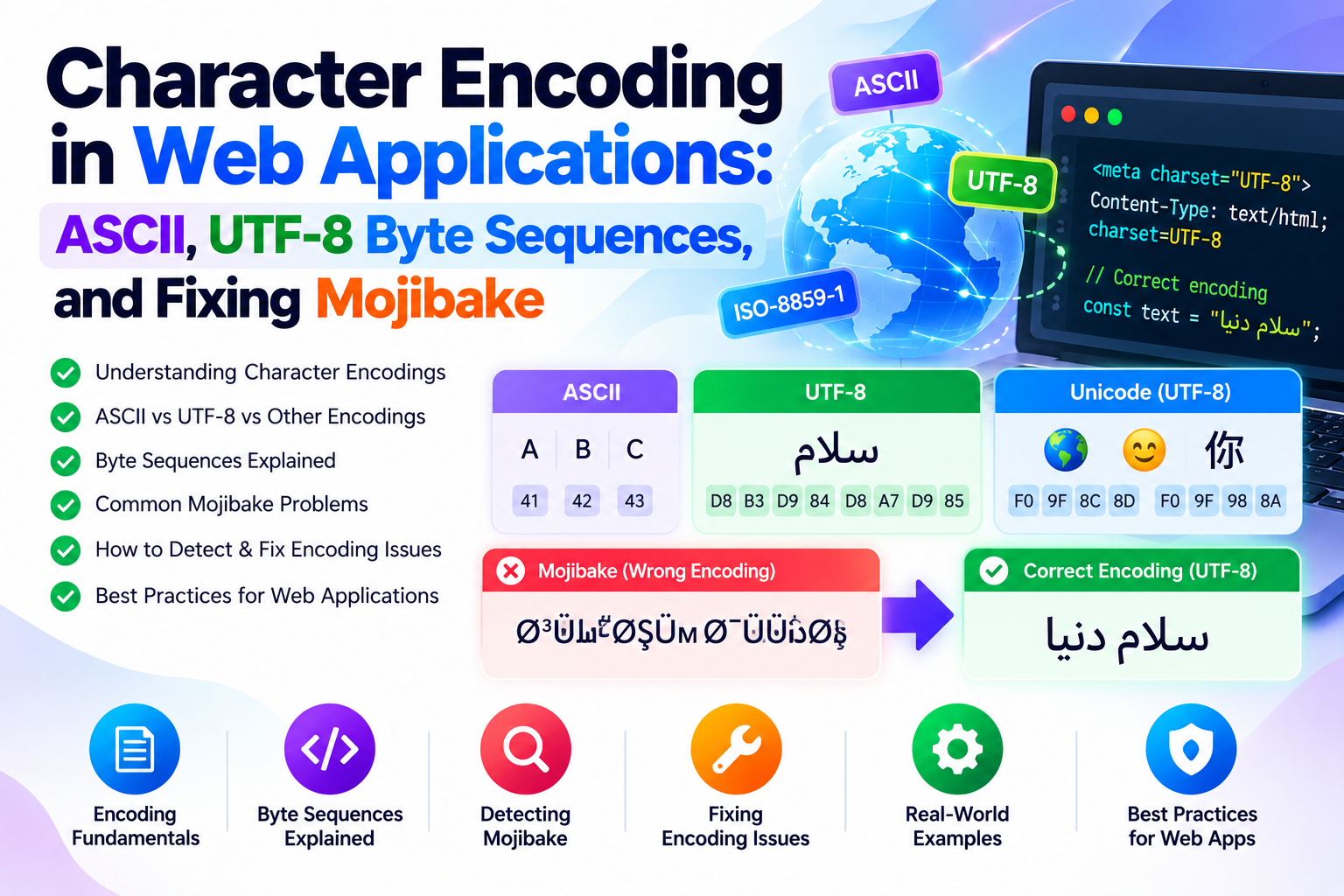
In international typography and computer science, this corrupt display of garbled characters is known by the Japanese loanword Mojibake (文字化け, literally "character transformation"). Mojibake is never random; it is the deterministic mathematical consequence of reading raw binary bytes using a different character encoding scheme than the one used to write them.
In this guide, I will deconstruct the underlying byte architecture of ASCII and UTF-8, trace the exact bit transformations that generate mojibake, analyze the hazards of Byte Order Marks (BOM), and provide tested repair strategies across PHP, Python, and modern JavaScript.
1. The Heritage of ASCII: The 7-Bit Foundation
In 1963, the American Standards Association published the American Standard Code for Information Interchange (ASCII). Designed primarily for teleprinters, ASCII mapped numerical values from 0 through 127 into exactly 7 bits of binary memory:
| Decimal Range | Hex Range | Character Class | Representative Examples |
|---|---|---|---|
| 0 – 31, 127 | 0x00 – 0x1F, 0x7F |
Control Characters | NUL (0), LF (10), CR (13), TAB (9), ESC (27) |
| 32 – 64 | 0x20 – 0x40 |
Punctuation & Digits | Space (32), 0–9 (48–57), @ (64) |
| 65 – 90 | 0x41 – 0x5A |
Uppercase Latin Alphabet | A (65 = 01000001), Z (90 = 01011010) |
| 97 – 122 | 0x61 – 0x7A |
Lowercase Latin Alphabet | a (97 = 01100001), z (122 = 01111010) |
Because computer memory operates in 8-bit octets (bytes), standard ASCII left the eighth high-order bit (0b10000000) unused, always set to zero. This simplicity succeeded for English-speaking communications, but as personal computing expanded globally, software vendors scrambled to utilize that spare 8th bit (values 128 through 255) for regional alphabets. This created dozens of mutually incompatible "extended ASCII" code pages (such as Windows-1252 in the Americas, ISO-8859-1 in Western Europe, and ISO-8859-5 for Cyrillic). A byte value of 0xE9 represented é in Western Europe, but signified the Cyrillic letter щ in Eastern Europe. The digital world was fragmented.
2. The Architecture of UTF-8: Variable-Length Ingenuity
In 1992, Ken Thompson and Rob Pike designed UTF-8 (Universal Character Set Transformation Format - 8-bit). Unlike legacy fixed-width encodings, UTF-8 is a variable-length encoding that can represent every single code point in the Unicode standard (over 1.1 million possible characters) using between 1 and 4 bytes per character.
UTF-8 achieved universal dominance because of two critical engineering decisions:
- 100% Backward Compatibility with ASCII: Any valid 7-bit ASCII document is already a valid UTF-8 document, byte-for-byte. If the high-order bit is
0, the byte is self-contained. - Self-Synchronizing Framing Bits: If data corruption drops a byte in transit, a UTF-8 parser can instantly re-synchronize to the start of the next character by inspecting the leading bits of each byte:
| Unicode Code Point Range | Byte Length | Binary Byte Layout (Prefixes in Bold) | Target Character Types |
|---|---|---|---|
U+0000 – U+007F |
1 Byte | 0xxxxxxx |
Standard ASCII characters |
U+0080 – U+07FF |
2 Bytes | 110xxxxx 10xxxxxx |
Latin with accents, Greek, Arabic, Hebrew |
U+0800 – U+FFFF |
3 Bytes | 1110xxxx 10xxxxxx 10xxxxxx |
Asian scripts (CJK), mathematical symbols, Euro (€) |
U+10000 – U+10FFFF |
4 Bytes | 11110xxx 10xxxxxx 10xxxxxx 10xxxxxx |
Emojis (🚀), historical scripts, rare symbols |
Notice how every continuation byte begins with the distinctive 2-bit prefix 10xxxxxx. This guarantees that a parser searching for character boundaries can never mistake a continuation byte for the leading byte of a new character.
3. Deconstructing the Genesis of Mojibake
How does clean text mutate into garbled gibberish? Let us trace the exact bit-level transformation of the Euro currency symbol (€):
Step 1: The Native UTF-8 Encoding
The Unicode code point for the Euro symbol is U+20AC. In binary, 0x20AC is 0010 0000 1010 1100. Fitting these bits into the 3-byte UTF-8 template produces:
Byte 1: 11100010 (0xE2)
Byte 2: 10000010 (0x82)
Byte 3: 10101100 (0xAC)
On disk, the symbol occupies 3 bytes: 0xE2 0x82 0xAC.
Step 2: The Erroneous Reading (Windows-1252 Misinterpretation)
Now, suppose a legacy database connection or email client configured for Windows-1252 opens this file. Rather than recognizing the three bytes as a unified sequence, it reads them as three separate single-byte characters:
0xE2in Windows-1252 maps toâ(small letter a with circumflex).0x82in Windows-1252 maps to‚(single low-9 quotation mark).0xACin Windows-1252 maps to¬(not sign).
On the user's screen, the single Euro symbol renders as the hideous string: €.
Step 3: The Double-Encoding Catastrophe
If an application reads that garbled string € and saves it back into a UTF-8 database without sanitization, each of those three separate characters is re-encoded into UTF-8! What was originally a 3-byte payload is now an 8-byte corrupted payload. Performing subsequent string replacements becomes significantly more complex once double encoding occurs.
4. The Hidden Hazard: The Byte Order Mark (BOM)
In UTF-16 and UTF-32 architectures, system endianness (Big-Endian vs. Little-Endian) determines whether the most significant byte comes first or last. To indicate this, compilers insert a Byte Order Mark (BOM) at the very beginning of the file.
In UTF-8, byte order is fixed; endianness does not exist. However, legacy software (most notably Microsoft Windows Notepad and Excel) frequently prefixes UTF-8 files with three invisible marker bytes:
0xEF 0xBB 0xBFThese bytes are invisible in graphical text editors, but they wreaked havoc on production software pipelines:
- JSON Parsers: The official RFC 8259 JSON specification strictly forbids a BOM. Node.js
JSON.parse()and PHPjson_decode()will fail with a syntax error at character position 0 if an invisible BOM is present. - PHP Header Errors: If a PHP source file contains a UTF-8 BOM, the PHP engine outputs those three bytes to the browser immediately upon parsing the opening tag, triggering the fatal
Warning: Cannot modify header information - headers already senterror. - Database Imports: CSV imports will frequently prepend the BOM to the first column name, resulting in a database column named
idinstead ofid.
5. Practical Mojibake Detection and Repair Strategies
Detecting and Stripping BOM Markers (PHP & Node.js)
In PHP, you can reliably strip leading BOM markers using a simple string operation:
function strip_utf8_bom(string $content): string {
    if (str_starts_with($content, "xEFxBBxBF")) {
        return substr($content, 3);
    }
    return $content;
}
In Node.js, you can strip the BOM directly during buffer or string decoding:
function stripBOM(str) {
    if (str.charCodeAt(0) === 0xFEFF) {
        return str.slice(1);
    }
    return str;
}
Repairing Double-Encoded Strings in PHP
When text has been misinterpreted from Windows-1252 into UTF-8, you can invert the mathematical transformation using PHP's multibyte string extension:
// Fixes "café" back to "café", and "€" back to "€"
function repair_mojibake(string $text): string {
    // Check if the string contains telltale mojibake sequences
    if (preg_match('/[xC2xC3xE2]/', $text)) {
        // Re-interpret the UTF-8 bytes as raw Windows-1252, then convert back to true UTF-8
        $fixed = mb_convert_encoding($text, 'Windows-1252', 'UTF-8');
        if (mb_check_encoding($fixed, 'UTF-8')) {
            return $fixed;
        }
    }
    return $text;
}
Python Text Sanitization Pipeline
Python 3 provides an elegant mechanism for handling corrupt bytes during file ingestion using the surrogateescape and replace error handlers:
# Robustly read files that may contain mixed encodings
with open('legacy_export.csv', 'r', encoding='utf-8', errors='replace') as f:
    for line in f:
        # Replaces invalid byte sequences with the Unicode Replacement Character (U+FFFD )
        process(line)
6. Production Golden Rules for Text Integrity
- Enforce UTF-8 End-to-End: Configure your database collation to
utf8mb4_unicode_ci(in MySQL/MariaDB) orUTF8(in PostgreSQL). Never use MySQL's legacyutf8collation, which only supports up to 3 bytes and crashes on 4-byte emojis. - Always Declare Charset in HTTP Headers: Set
Content-Type: text/html; charset=utf-8in your web server configurations, and include<meta charset="utf-8">in the first 1024 bytes of your HTML head. - Use Length-Safe String Functions: In PHP, never use
strlen()orsubstr()on user input containing non-ASCII text; always usemb_strlen($str, 'UTF-8')andmb_substr()to prevent splitting multi-byte characters in half.
When analyzing character counts, hex bytes, and text transformations, test your strings with our free online Character Counter, ASCII Converter, and Case Converter utilities.