In the earliest days of electronic computing, mechanical input terminals like the Teletype Model 33 supported only a single 5-bit or 7-bit character set: uppercase letters, numerals, and rudimentary punctuation. Spaces were often restricted or interpreted as command delimiters in command-line interpreters. As programming languages evolved to represent complex abstract models, software engineers confronted a fundamental challenge: how do you combine multiple words into a single continuous programmatic identifier that is both parser-safe and effortlessly legible to human readers?
Over the decades, different computer language communities converged on distinct typographic naming conventions. Today, a modern full-stack web application is a mosaic of different casing styles: database columns written in snake_case, REST API responses serialized into camelCase, frontend components declared in PascalCase, and CSS stylesheets styled using kebab-case. Understanding why these standards exist and how to translate between them across architectural boundaries is an essential skill for every software engineer.
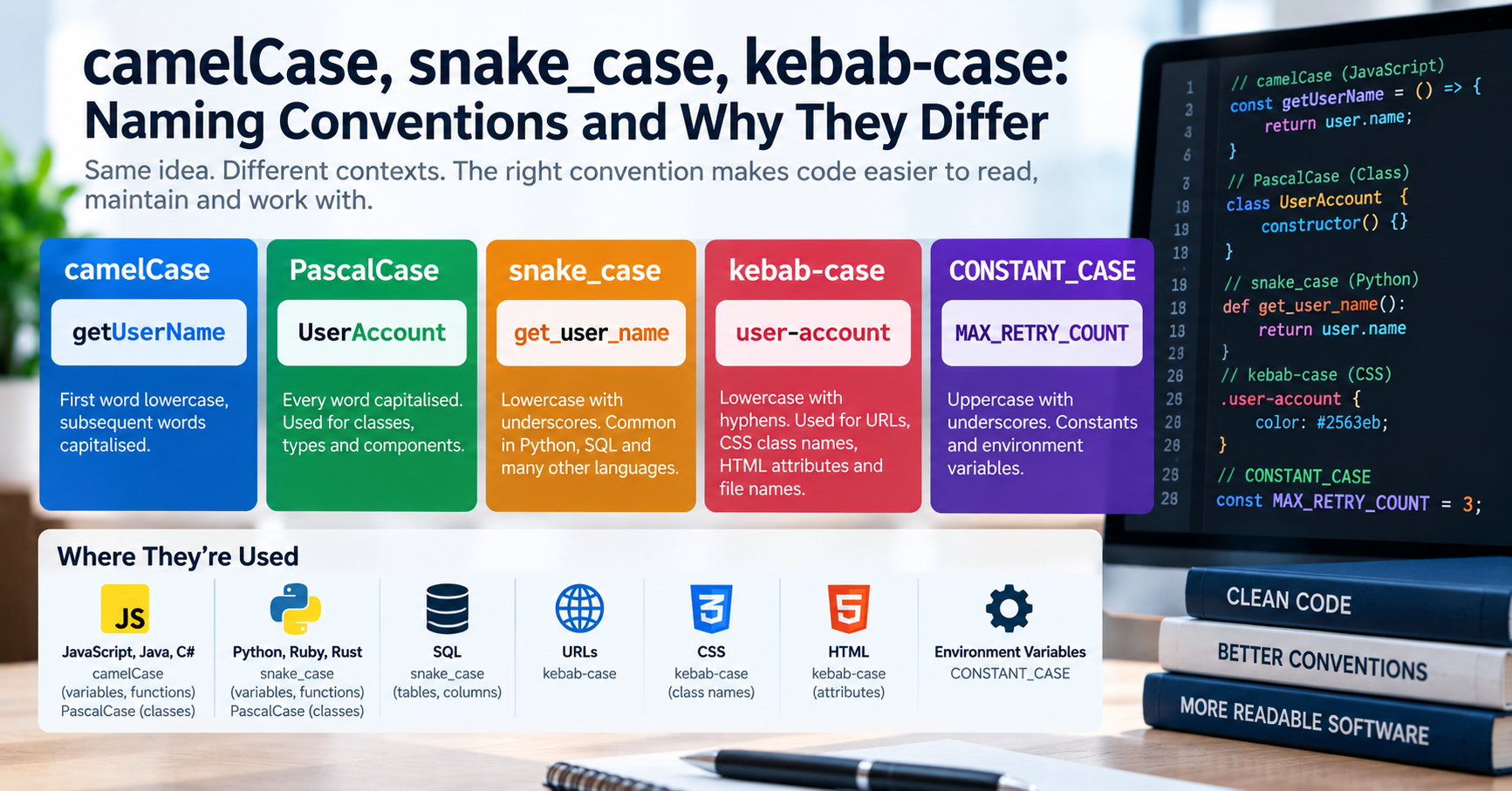
The Major Programming Case Styles: A Technical Breakdown
| Convention | Formatting Pattern | Primary Ecosystems | Typical Structural Usage |
|---|---|---|---|
| camelCase | Initial lowercase letter; subsequent words capitalized without spaces. (userAccountBalance) |
JavaScript, TypeScript, Java, Swift, Kotlin, Dart | Variables, object keys, class methods, function parameters, and JSON payloads. |
| PascalCase (UpperCamelCase) | Every word capitalized without spaces. (UserAccountBalance) |
C#, Java, TypeScript, React (JSX), PHP, Rust | Class names, React/Vue UI components, interfaces, type aliases, and enums. |
| snake_case | All lowercase words separated by underscores. (user_account_balance) |
Python, Ruby, Rust, C, PostgreSQL, MySQL | Database table and column names, Python functions, module filenames. |
| kebab-case | All lowercase words separated by hyphens. (user-account-balance) |
HTML, CSS, Web Components, URLs, Linux CLI flags | CSS class selectors, custom HTML attributes (data-user-id), URL slugs. |
| SCREAMING_SNAKE | All uppercase words separated by underscores. (USER_ACCOUNT_BALANCE) |
Universal across all programming languages | Global constants, environment variables (DATABASE_URL), immutable configuration values. |
Why Can't We Use kebab-case in JavaScript or Python?
Junior engineers frequently ask: "kebab-case is so easy to read on the eyes—why don't JavaScript or Python allow variable names like total-order-cost?"
The answer lies in compiler lexer tokenization. In almost all high-level programming languages, the hyphen (-) is reserved as the subtraction operator. When a compiler or JavaScript interpreter encounters total-order-cost, it does not see a single variable name; it parses it as an arithmetic expression: variable total minus variable order minus variable cost. Because the parser cannot distinguish a hyphenated identifier from mathematical subtraction, kebab-case is strictly illegal for identifiers in C, Java, JavaScript, Python, and Go.
In HTML and CSS, however, subtraction is not a fundamental lexical operation (subtraction only occurs inside the specialized calc() function). As a result, CSS adopted kebab-case as its official standard, giving web developers the clean readability of hyphenated properties like background-color and font-family.
Cross-Boundary Deserialization: The Full-Stack Problem
In full-stack engineering, a recurring architectural friction occurs at the boundary between your relational database and your frontend client. Consider this typical data journey:
- Your PostgreSQL or MySQL database stores columns in
snake_case:first_name,billing_address_line_1,is_verified. - Your backend API queries the database and serializes the records directly to JSON:
{"first_name": "Sarah", "is_verified": true}. - Your TypeScript frontend consumes the API. In TypeScript, corporate style guides mandate
camelCase:firstName,isVerified.
If you force your TypeScript models to adopt snake_case to match the database, your frontend codebase becomes stylistically inconsistent. If you re-map every property by hand, you write hundreds of lines of fragile boilerplate mapping code.
Automated Type-Level Mapping in TypeScript
Modern TypeScript allows you to automate this mapping at compile time using advanced recursive template literal types. You can define a zero-cost utility type that converts any snake_case string type into camelCase automatically:
// TypeScript Type-Level Converter: snake_case to camelCase
type SnakeToCamelCase<S extends string> = S extends `${infer P1}_${infer P2}${infer P3}`
  ? `${Lowercase<P1>}${Uppercase<P2>}${SnakeToCamelCase<P3>}`
  : Lowercase<S>;

type CamelizeKeys<T> = {
  [K in keyof T as SnakeToCamelCase<string & K>]: T[K] extends object ? CamelizeKeys<T[K]> : T[K];
};

// Example usage:
interface DbUserRow {
  user_first_name: string;
  is_account_active: boolean;
}

type FrontendUser = CamelizeKeys<DbUserRow>;
// Results in: { userFirstName: string; isAccountActive: boolean; }
By pairing compile-time TypeScript mapping with runtime middleware libraries (such as camelcase-keys in Node.js or Pydantic aliases in FastAPI), your database retains clean SQL snake_case while your frontend enjoys pure, strongly-typed camelCase without manual mapping errors.
Database Collations and Case-Sensitivity Gotchas
When designing database schemas, keep in mind how your relational database evaluates identifier case. In PostgreSQL, all unquoted table and column names are automatically converted to lowercase. If you create a table with CREATE TABLE Users (UserID INT), PostgreSQL stores the column as userid. To query it with mixed casing, you would be forced to quote it every single time: SELECT "UserID" FROM "Users", which causes severe ORM bugs. Adhering to strict lowercase snake_case (e.g. user_id) avoids this issue entirely.
Similarly, in MySQL running on Linux, table names correspond to actual files on the underlying filesystem. Because Linux filesystems (ext4) are case-sensitive while Windows (NTFS) and macOS (APFS) are case-insensitive, developing locally with mixed casing (UserProfile.frm) will crash your application when deployed to an Ubuntu production server unless you maintain strict lowercase naming discipline.
HTTP Headers and Case-Insensitivity Standards (RFC 7230)
Another area where case conventions frequently confuse web engineers is HTTP request and response headers. In standard documentation, headers are written in hyphenated Title Case (also called Train-Case): Content-Type, Authorization, X-Custom-Header. However, according to the official HTTP/1.1 specification (RFC 7230) and HTTP/2 standards, header field names are strictly case-insensitive.
When an incoming HTTP request arrives at a Node.js Express server, the framework automatically converts all header keys to lowercase (e.g. req.headers['content-type']). If a frontend developer writes strict code that checks if (headers['Content-Type']), the check evaluates to undefined. Understanding that HTTP headers collapse to lowercase while custom payload bodies adhere to camelCase prevents frustrating production integration bugs.
Converting Conventions Quickly
When migrating database schemas, generating TypeScript interfaces from legacy SQL dumps, or normalizing messy API payloads during integration testing, retyping identifiers manually is a recipe for typos. Our free Case Converter tool lets you paste any list of identifiers and transform between camelCase, snake_case, PascalCase, and kebab-case with a single click, ensuring your code remains clean, consistent, and defect-free.