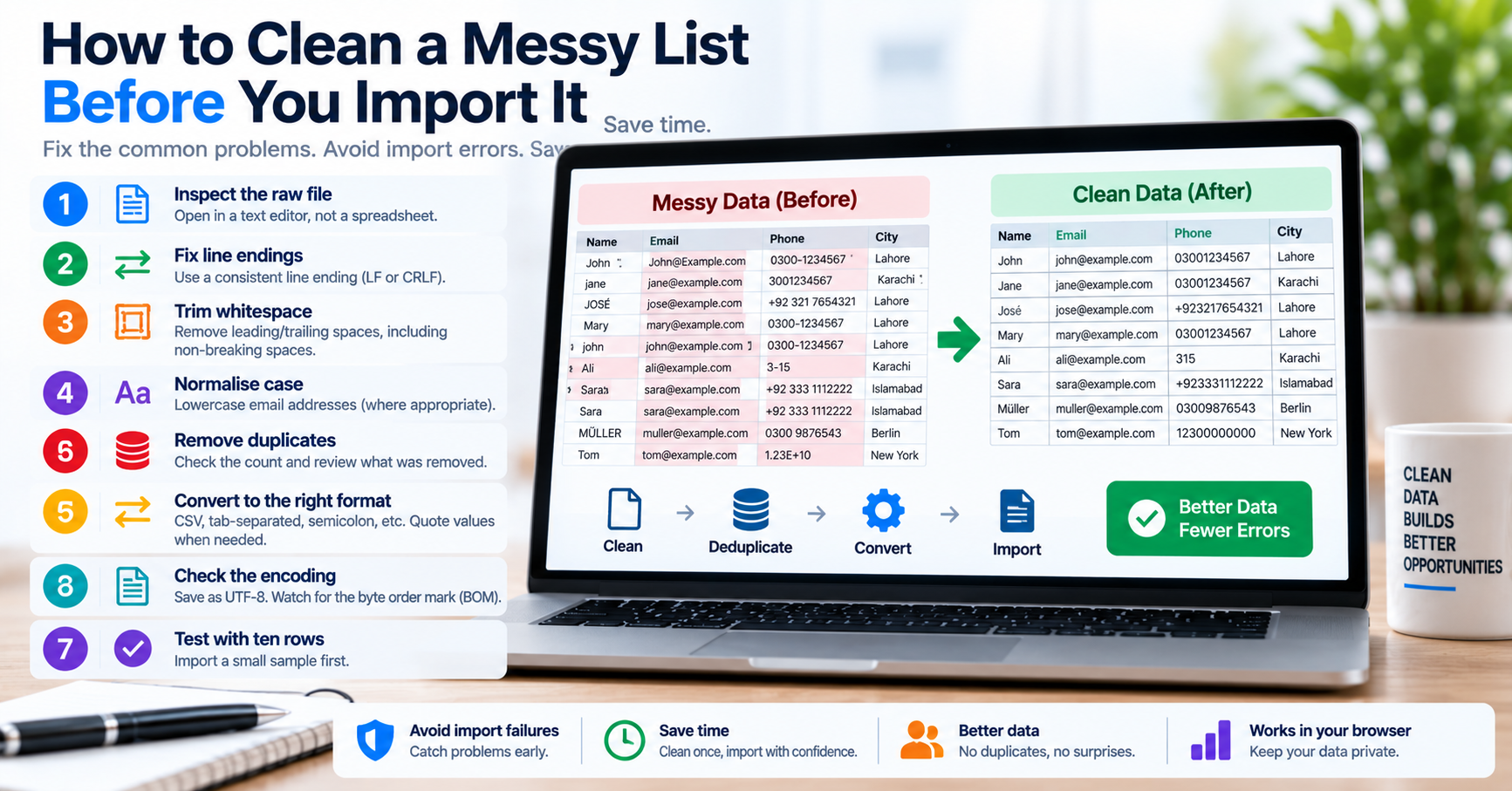
Whether you are ingesting a list of 50,000 product SKUs into an e-commerce catalog, sanitizing user email addresses from a legacy CRM export, or preparing IP whitelist ranges for a web application firewall (WAF), raw data exports are notoriously messy. Instead of clean, well-behaved records, you receive an unstructured text file filled with mixed line endings (CRLF vs. LF), inconsistent delimiters (commas, semicolons, tabs), phantom non-breaking spaces, and duplicate rows.
If you attempt to feed that raw text directly into a relational database or an automated ETL (Extract, Transform, Load) pipeline, the consequences are immediate: SQL queries fail with syntax errors, database batch inserts crash halfway through, or duplicate records corrupt reporting metrics. Here is an architectural deep-dive into how text tokenization works, how to transform delimiters safely, and how to prepare large lists for reliable database ingestion.
The 5 Stages of Production List Transformation
Transforming an unorganized list of items into clean database records requires a disciplined, multi-stage processing pipeline:
| Processing Stage | Target Defect | Damage If Neglected | Algorithmic Solution |
|---|---|---|---|
| 1. Normalization | Mixed Windows (\r\n) and Unix (\n) line breaks |
Carriage returns remain embedded in string fields, corrupting JSON exports. | Replace all CRLF and bare CR sequences with standard Unix LF (\n). |
| 2. Tokenization & Trimming | Leading/trailing spaces, non-breaking spaces (U+00A0) |
Exact match lookups fail: "SKU-101" !== "SKU-101 ". |
Split by delimiter, convert non-breaking spaces to standard space, strip outer padding. |
| 3. Empty Element Pruning | Blank lines and double delimiter separators (e.g. a,,b) |
Inserts empty strings or NULL values into NOT NULL database columns. | Filter array elements where length === 0 or whitespace-only. |
| 4. Deduplication | Repeated rows and case-insensitive duplicates | Triggers unique constraint collisions and wasted storage. | Pass elements through an in-memory Hash Set in $O(n)$ linear time. |
| 5. Re-serialization | Target formatting (CSV, SQL IN, JSON array) | Missing quotes or commas break destination database syntax. | Join with target delimiter and wrap each token in specified boundary quotes. |
Delimiter Transformation: Converting Columns to SQL Query Strings
One of the most frequent operational challenges occurs when an engineer receives a vertical list of items in an email or spreadsheet and needs to run an SQL query against them:
-- Raw input from spreadsheet (vertical column):
user_1082
user_3491
user_8820
user_9012
Attempting to paste that raw vertical column into an SQL query will throw an immediate syntax error. SQL requires a horizontal, comma-delimited, quoted list:
-- What SQL actually requires:
SELECT id, email, status FROM users WHERE username IN ('user_1082', 'user_3491', 'user_8820', 'user_9012');
If you have five hundred user IDs, manually adding single quotes and commas in a basic text editor takes twenty minutes of tedious typing. Using our free online Text Separator, you can accomplish this in seconds:
- Paste the vertical column into the input area.
- Set Split By to New Line.
- Set Join With to Comma + Space (
,). - Enable the Wrap in Single Quotes option.
- Click Convert—your complete, query-ready SQL string is instantly generated and copied to your clipboard.
Command-Line Shell Stream Processing for Multi-Gigabyte Files
When working with massive dataset files (such as 10 GB access logs or multi-million-row CSV exports) that exceed your browser's RAM capacity, standard Linux command-line utilities provide lightning-fast streaming transformations without loading the entire file into memory:
# 1. Normalize line endings: strip Windows carriage returns (\r)
tr -d '\r' < raw_dirty_data.txt > step1_lf.txt

# 2. Extract column 2 from a comma-separated file and strip whitespace
cut -d ',' -f 2 step1_lf.txt | sed 's/^[ \t]*//;s/[ \t]*$//' > step2_trimmed.txt

# 3. Filter out empty lines
sed '/^$/d' step2_trimmed.txt > step3_nonempty.txt

# 4. Deduplicate while preserving original chronological order (AWK linear time O(n))
awk '!seen[$0]++' step3_nonempty.txt > step4_deduped.txt

# 5. Format into SQL-quoted strings with commas
sed "s/.*/'&',/" step4_deduped.txt > final_sql_values.sql
The AWK one-liner awk '!seen[$0]++' utilizes an associative hash table in memory. Because it processes the stream line-by-line, it can deduplicate a 5 GB file in under thirty seconds while consuming only a few megabytes of RAM.
Production Database Batch Inserts: Chunking to Avoid Timeouts
Once your list has been organized and formatted, never attempt to insert 50,000 records in a single giant SQL query. A 20 MB SQL query string will frequently crash your MySQL database with an error: Got a packet bigger than 'max_allowed_packet' bytes. Beyond packet size crashes, giant monolithic queries hold long table locks, blocking production web traffic.
The correct engineering architecture is batch chunking: group your clean records into batches of 500 to 1,000 items per INSERT statement, executing each batch inside an explicit transaction block:
-- Chunk 1 (Rows 1 to 500):
START TRANSACTION;
INSERT INTO product_skus (sku, status) VALUES
('SKU-0001', 'active'),
('SKU-0002', 'active'),
-- ... 500 rows ...
('SKU-0500', 'active');
COMMIT;

-- Chunk 2 (Rows 501 to 1000):
START TRANSACTION;
INSERT INTO product_skus (sku, status) VALUES
('SKU-0501', 'active'),
-- ... 500 rows ...
('SKU-1000', 'active');
COMMIT;
Handling Escaped Quotes and Embedded Delimiters (RFC 4180 Rules)
One of the most persistent bugs in automated list processing occurs when individual records contain natural delimiter characters. For example, consider an address column in a customer export:
"Suite 400, Market St"
"Building B, Floor 2"
If an automated script or naive parser splits lines by raw commas without respecting quotation boundaries, that single address field splits into two separate, broken columns: "Suite 400" and " Market St". Under the formal RFC 4180 specification for CSV data:
- Any text field containing a delimiter (comma), a newline (
\n), or a double quotation mark must be enclosed within outer double quotation marks. - If a value contains a literal double quotation mark, that mark must be escaped by prefixing it with an additional double quotation mark:
"The ""Official"" Documentation".
Our online Text Separator respects these quotation boundary rules automatically. When you split or join text, the parser recognizes escaped quote strings, ensuring that embedded commas do not fracture your dataset.
Python Pandas vs. Browser Utilities: When to Use Which
In data engineering teams, a common debate is whether to write a Python Pandas script or use a browser-based utility for quick data cleaning:
| Criterion | Python Pandas Script | Client-Side Browser Utility (TU Web Tools) |
|---|---|---|
| Setup Overhead | High: Requires Python 3, virtual environment, and pip install pandas (150+ MB dependencies). |
Zero: Open browser tab, paste data, click Convert. Ready in 2 seconds. |
| Ideal Dataset Size | Large to Massive: 100,000+ rows up to 10 GB (utilizing chunked disk streaming). | Small to Medium: 1 to 50,000 rows (operates in browser JavaScript memory). |
| Primary Use Case | Scheduled ETL pipelines, complex joins, mathematical aggregations. | Ad-hoc data cleaning, formatting SQL queries, formatting lead lists on the fly. |
| Data Privacy | Local machine execution. | 100% Client-Side: No data leaves your machine or network. |
For large scheduled ETL pipelines processing millions of rows nightly, automated Python scripts are irreplaceable. But for the dozens of ad-hoc formatting tasks engineers face daily—such as preparing an SQL query or deduplicating a list of IDs—launching a Jupyter notebook or writing a Python script is massive overkill. A browser utility solves the problem in seconds.
Batch chunking achieves the optimal balance: it avoids the massive network overhead of individual single-row inserts while keeping query packet sizes and database transaction log locks well within safe production thresholds.