
Slug Generator Tool
Create clean, SEO-friendly URL slugs instantly with our free online Slug Generator Tool. Convert titles, phrases, and text into readable, optimized URLs that improve search engine visibility and user experience.
FAQ
Are TU Web Tools free to use?
Yes. TU Web Tools offers a wide range of free online utilities that can be used without purchasing software or subscriptions. Our goal is to make useful digital tools accessible to everyone.
Do I need to create an account?
Most tools can be used immediately without registration. Some future features may require an account, but the majority of utilities remain freely accessible.
Is my data stored on your servers?
We respect user privacy. Many tools process information instantly and do not permanently store user data. Please review our Privacy Policy for complete details.
Can I use TU Web Tools on mobile devices?
Yes. The platform is fully responsive and optimized for smartphones, tablets, laptops, and desktop computers.

- Free to Use
- No Registration
- Mobile Friendly
- Unlimited Usage
Benefits of Using a Slug Generator Tool
Improve SEO
Create search engine-friendly URLs.
Enhance Readability
Generate clean and user-friendly links.
Save Time
Automatically format URLs in seconds.
Easy to Use
No software installation required.
How to Use the Tool
Step 1
Enter Your Title or Text
Step 2
Click Generate Slug
Step 3
Review the Generated URL Slug
Step 4
Copy and Use the Result
Popular Use Cases
Blog Posts
Website Pages
E-commerce Products
Category Pages
SEO Campaigns
Landing Pages
CMS Publishing
Digital Marketing
Use Slug Generator Tool Online
What is a Slug Generator Tool?
A Meta Tags Checker Tool allows users to analyze the meta tags of any webpage and review important SEO elements that influence search engine visibility and social media sharing. Meta tags provide information about a webpage to search engines and browsers, helping them understand the content and purpose of the page.
This tool helps SEO professionals, website owners, marketers, bloggers, and developers quickly identify missing or poorly optimized tags. By reviewing titles, descriptions, robots directives, canonical URLs, Open Graph tags, and Twitter Card metadata, users can optimize their websites for better rankings and user engagement.
FAQ
Are TU Web Tools free to use?
Yes. TU Web Tools offers a wide range of free online utilities that can be used without purchasing software or subscriptions. Our goal is to make useful digital tools accessible to everyone.
Do I need to create an account?
Most tools can be used immediately without registration. Some future features may require an account, but the majority of utilities remain freely accessible.
Is my data stored on your servers?
No. Slug generation is processed instantly, and we do not permanently store your text.
What case formats are supported?
The tool supports Uppercase, Lowercase, Sentence Case, Title Case, Toggle Case, camelCase, PascalCase, and other popular text formats.
What is a URL slug?
A URL slug is the part of a web address that appears after the domain name and describes the content of a page in a readable format.
Why are SEO-friendly slugs important?
SEO-friendly slugs help search engines understand webpage topics and improve the user experience by creating clear and meaningful URLs.
Can I generate slugs from long titles?
Yes. The tool can convert both short phrases and lengthy titles into optimized URL slugs.
Who can benefit from TU Web Tools?
Bloggers, SEO professionals, marketers, website owners, developers, agencies, content creators, and anyone publishing content online.
Related Tools
Meta Tags Checker →
Analyze website meta tags and improve SEO performance.
URL Encoder →
Encode URLs safely for web transmission and compatibility.
URL Decoder →
Decode URL-encoded strings back into readable format.
JSON Validator & Beautifier →
Validate, format, and beautify JSON data instantly.
Need More Free Text Tools?
Explore our collection of free online text, SEO, developer, and productivity tools.
LATEST ARTICLES
Learn, Improve & Stay Updated
Explore practical guides, tutorials, SEO tips, developer resources, and productivity insights to help you work smarter online.
- All Posts
- Business & Learning
- Developer & Technical Guides
- Online Tools & Productivity
- Security & Privacy
- SEO & Website Optimization

How to Create Strong Passwords and Protect Your Accounts Introduction In today’s digital world, passwords serve as the first line

Online Privacy Tips: How to Keep Your Personal Data Safe Introduction The internet has become an essential part of daily
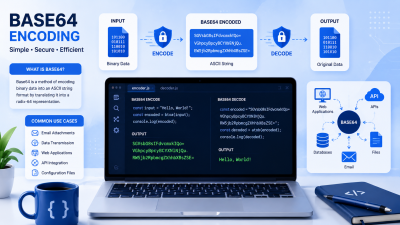
Understanding Base64 Encoding and Common Use Cases Introduction In modern web development and data communication, information often needs to be