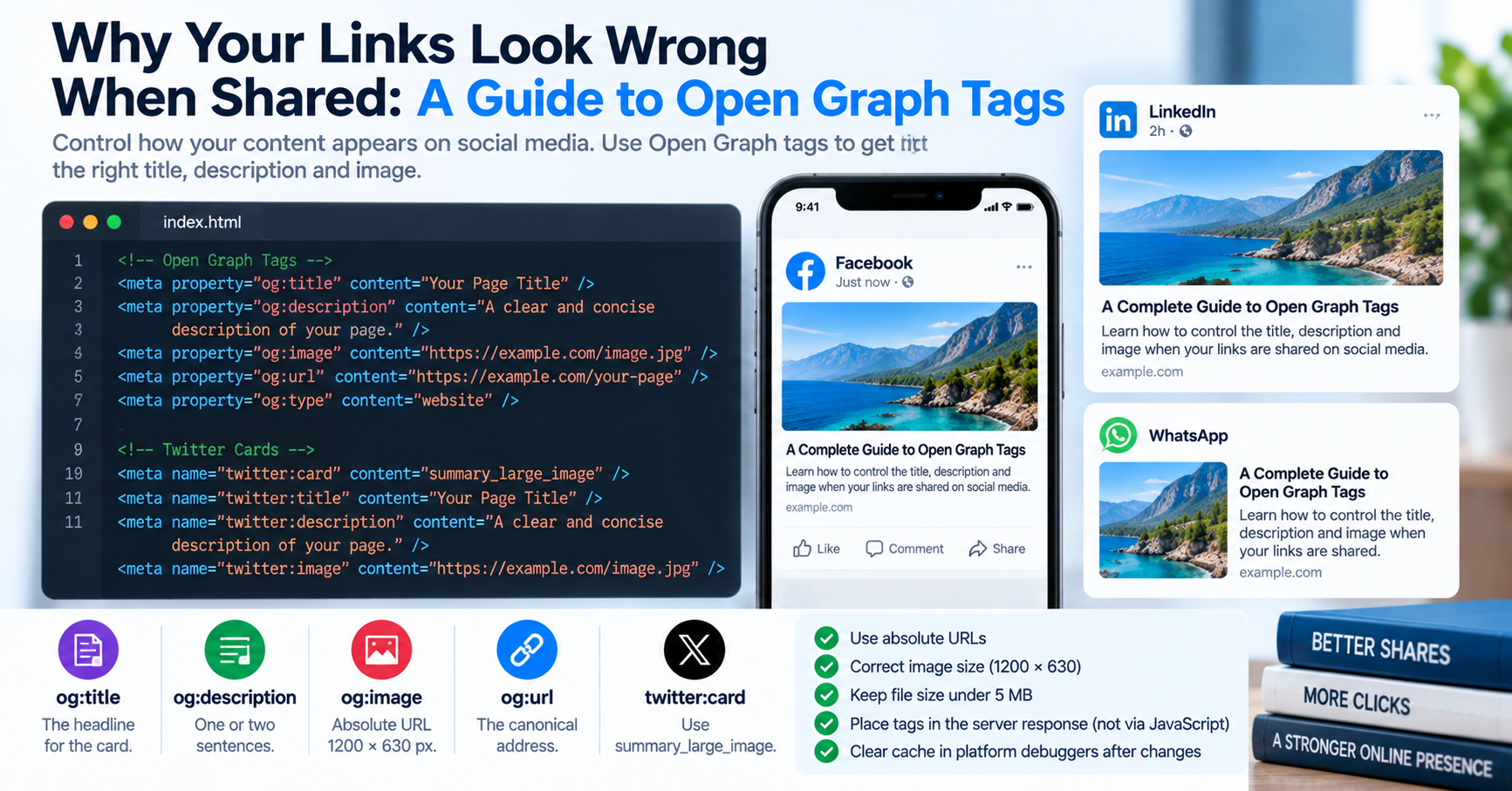
Every software engineer, product manager, and content marketer has experienced this frustrating moment: you publish a major feature launch or write a comprehensive blog article. You copy the URL, paste it into a company Slack channel, a LinkedIn post, or a WhatsApp message, eagerly anticipating a polished preview card featuring your branded hero image, punchy headline, and crisp summary.
Instead, the platform renders a broken preview: an embarrassing blank gray box, a stretched and blurry thumbnail, an outdated headline from a staging draft, or worst of all, no preview card whatsoever. Why do links break so consistently across social platforms, and how can developers ensure that every shared link renders with pixel-perfect visual fidelity?
The Architecture of Social Previews: The Open Graph Protocol
When you paste a link into Slack, Twitter/X, LinkedIn, or iMessage, the messaging client does not display the link blindly. Behind the scenes, the platform's backend crawler (such as facebookexternalhit, LinkedInBot, or Twitterbot) immediately makes an automated HTTP request to fetch your webpage's raw HTML source code.
These crawlers do not execute JavaScript single-page applications (SPAs) or wait for client-side React hydration. Instead, they scan the static HTML <head> element for standardized metadata defined by the Open Graph (OG) protocol (originally created by Facebook in 2010):
| Open Graph Tag | Required Syntax | Optimal Technical Specs | Rendering Behavior |
|---|---|---|---|
og:title |
<meta property="og:title" content="..."> |
40 to 60 characters | Displayed as the bold card headline. Avoid repeating the brand name if already in the URL. |
og:description |
<meta property="og:description" content="..."> |
100 to 140 characters | Secondary supporting summary. Truncated aggressively on mobile screens after two lines. |
og:image |
<meta property="og:image" content="..."> |
1200 × 630 pixels (1.91:1 aspect ratio) | The primary visual banner. Must be an absolute HTTPS URL and under 1 MB in file size. |
og:url |
<meta property="og:url" content="..."> |
Absolute canonical URL | Consolidates all social likes and shares onto a single authoritative link. |
twitter:card |
<meta name="twitter:card" content="summary_large_image"> |
summary_large_image |
Instructs Twitter/X crawlers to render a full-width cinematic banner rather than a tiny square icon. |
The Top Four Mistakes That Break Social Link Previews
1. Using Relative Image URLs
The most common bug in modern web development is declaring relative image paths in metadata:
<!-- BROKEN: Social crawlers cannot resolve relative links! -->
<meta property="og:image" content="/assets/hero-banner.jpg">

<!-- CORRECT: Always declare the full absolute HTTPS URL -->
<meta property="og:image" content="https://tuwebtools.com/assets/hero-banner.jpg">
When a crawler visits your page, it parses metadata literally. Because the crawler is not running inside a browser session, it cannot resolve relative paths like /assets/hero-banner.jpg, resulting in an immediate 404 error and a blank card.
2. Incorrect Image Dimensions and Aspect Ratios
The universal industry standard for Open Graph images is 1200 × 630 pixels, corresponding to an exact aspect ratio of 1.91:1. If you provide a square image (such as 600 × 600) or an oversized portrait photograph, social platforms like Facebook and LinkedIn will either crop the image awkwardly (cutting off text and faces) or drop the layout down to a tiny, low-CTR thumbnail box.
3. Client-Side Rendering (CSR) Traps in Single-Page Apps
If you build applications using pure client-side React (like default Vite or Create React App), your server delivers an empty HTML shell: <div id="root"></div>. The actual page title, description, and metadata are injected later by JavaScript using react-helmet.
Because social media crawlers do not execute client-side JavaScript, they only see the blank HTML shell. To fix this, modern applications must use Server-Side Rendering (SSR) or Static Site Generation (SSG) with frameworks like Next.js, Nuxt, or Astro, ensuring that complete Open Graph tags are baked into the raw HTML delivered by the initial server response.
4. Aggressive Crawler Caching: The Update Nightmare
Once Facebook, LinkedIn, or Slack crawls your webpage's Open Graph tags, they store the scraped data in their internal edge cache for up to 30 days. If you notice a typo in your headline or upload a corrected hero image, simply updating the HTML on your server will not update existing social cards.
To force social crawlers to purge their cache and re-scrape your page immediately, use the official platform debugging tools:
- Facebook / Meta: Use the Facebook Sharing Debugger. Enter your URL and click Scrape Again.
- LinkedIn: Use the LinkedIn Post Inspector to clear cached card data.
- Twitter / X: Tweet the link with an arbitrary dummy query parameter (e.g.
https://tuwebtools.com?v=2) to bypass edge caching.
Open Graph Type Hierarchy: Website vs. Article vs. Product
The og:type property dictates how social platforms interpret and categorize your content. Specifying the wrong type limits platform functionality:
og:type="website": Default type for homepages, tool landing pages, and category hubs.og:type="article": Mandatory for blog posts, documentation, and news releases. When set toarticle, you can supply supporting metadata likearticle:published_time,article:author, andarticle:section, allowing platforms like LinkedIn to attribute content to verified author profiles.og:type="product": Recommended for e-commerce listings, enabling price, currency, and availability attributes.
WhatsApp and iMessage Quirks: The apple-touch-icon Fallback
Messaging applications handle metadata differently than social feeds. In WhatsApp and Apple Messages (iMessage), if your Open Graph image exceeds 300 KB, the mobile client may refuse to download the large image over cellular data to save user bandwidth. In such cases, iMessage automatically falls back to your site's <link rel="apple-touch-icon" href="/icon.png">. Ensuring you have a crisp 180x180 PNG icon declared in your <head> ensures your brand displays gracefully even on spotty cellular connections.
Dynamic Open Graph Image Generation
For websites publishing hundreds of dynamic pages (such as e-commerce catalogs, user profiles, or automated tools), designing individual 1200x630 banners in Figma by hand is impossible. Modern engineering teams generate social cards dynamically at the edge using libraries like @vercel/og (powered by Satori) or serverless Puppeteer scripts:
// Example Next.js Edge OG Image Route (app/og/route.tsx)
import { ImageResponse } from 'next/og';

export const runtime = 'edge';

export async function GET(request: Request) {
  const { searchParams } = new URL(request.url);
  const title = searchParams.get('title') || 'TU Web Tools';

  return new ImageResponse(
    (
      <div style={{ display: 'flex', width: '100%', height: '100%', background: '#0f172a', color: '#fff', padding: 80, flexDirection: 'column', justifyContent: 'center' }}>
        <h1 style={{ fontSize: 64, fontWeight: 'bold' }}>{title}</h1>
        <p style={{ fontSize: 28, color: '#38bdf8' }}>tuwebtools.com — Free Developer Tools</p>
      </div>
    ),
    { width: 1200, height: 630 }
  );
}
You can audit and preview how your live web pages render across Google, Facebook, LinkedIn, and Twitter in real time using our free Meta Tags Checker tool.