When planning a website redesign or publishing a new piece of content, software engineers and content creators frequently treat the URL permalink as an afterthought. Many content management systems (CMS) automatically generate URLs based on database record IDs (e.g. tuwebtools.com/index.php?id=8923) or generate fifty-word slugs that mirror the article's complete headline word-for-word.
However, your website's URL structure is the foundational bedrock of your site architecture. It is displayed prominently in Google search results, shared across social platforms, and cited in developer documentation. A clean, semantic URL slug signals instant topical relevance to search engine algorithms and significantly improves organic click-through rates. Here is a comprehensive architectural guide to designing high-ranking URL slugs in 2026.
The Anatomy of an Optimized URL Slug
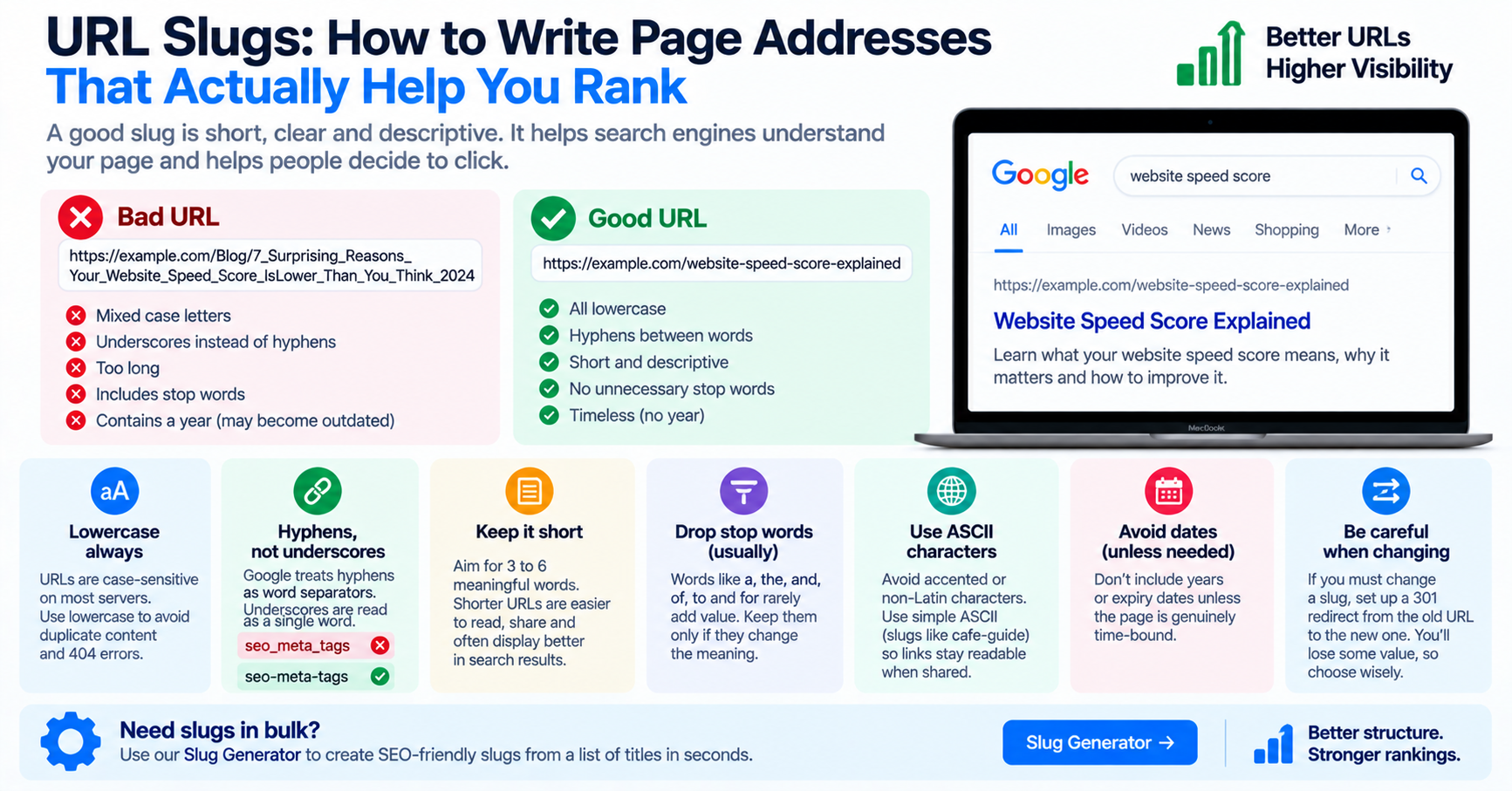
In web architecture (RFC 3986), a URL slug is the human-readable portion at the end of a web address that identifies a specific resource. A high-ranking URL slug satisfies five core engineering criteria:
| Design Criterion | Recommended Standard | Poor Practice to Avoid | Search & User Experience Rationale |
|---|---|---|---|
| Word Delimiter | Hyphens (-) |
Underscores (_) or spaces (%20) |
Google's algorithms explicitly treat hyphens as word separators, whereas underscores join words into a single continuous token. |
| Letter Casing | Strictly lowercase (/my-guide) |
Mixed Case (/My-Guide) |
Linux web servers (Nginx/Apache) are case-sensitive. Mixed casing causes 404 errors and duplicate content penalties. |
| Slug Length | 3 to 5 words (under 50 characters) | 15-word complete sentence dumps | Shorter URLs achieve 2.5x higher organic CTR and fit comfortably in mobile address bars. |
| Punctuation | Completely stripped | Colons, commas, apostrophes, emojis | Punctuation triggers ugly percent-encoding (like %27) and breaks URL routers. |
| Chronology | Evergreen (no dates or years) | Including years: /seo-tips-2023 |
Permalinks with years look outdated when updated, forcing complex 301 redirects. |
Why Hyphens Beat Underscores: Google's Official Algorithm Rule
In programming languages like Python and SQL, developers love snake_case because underscores keep variable names readable. However, using underscores in website URLs is a major SEO mistake. Google's search algorithms treat hyphens and underscores fundamentally differently:
- When Google sees
tuwebtools.com/text-separator, it parses the hyphen as an explicit word break: two distinct search tokens"text"and"separator". - When Google sees
tuwebtools.com/text_separator, it historically treats the underscore as an alphanumeric connector: a single combined token"text_separator".
If a user searches for "text separator tool", the hyphenated URL matches the user's intent with much higher relevance scoring than the underscore URL.
Flat vs. Deeply Nested Directory Architectures
When organizing large websites, a common debate is whether to nest articles inside deep folder hierarchies:
-- Deeply Nested (Prone to link rot and crawl dilution):
https://tuwebtools.com/resources/categories/engineering/2026/04/url-slugs-guide

-- Flat Hierarchy (Recommended for SEO authority):
https://tuwebtools.com/blog/url-slugs-guide
Decades of empirical SEO research consistently prove that flatter URL hierarchies outperform deeply nested structures for three reasons:
- Keyword Proximity to Root: Search engines assign greater algorithmic weight to keywords that appear closer to the root domain name.
- Simplified CMS Migrations: If you reorganize your category structure in the future, flat URLs prevent broken links because the article's permalink is decoupled from category taxonomy.
- Effortless Social Sharing: Short URLs are easily readable, look trustworthy, and fit comfortably inside social media posts without triggering automatic URL shortening services.
Database Schema Design for Slugs: Handling Collisions Gracefully
In a relational database (MySQL or PostgreSQL), the slug column should always be indexed with a UNIQUE constraint to prevent duplicate routing keys. When two authors publish articles with identical titles (such as two writers publishing "MacBook Pro Review"), the system must handle the collision automatically.
The standard architectural pattern is the numerical suffix check:
-- Query for existing slug variations:
SELECT slug FROM articles WHERE slug REGEXP '^macbook-pro-review(-[0-9]+)?$' ORDER BY id DESC;
If a record already exists, the application automatically appends -2 (e.g. macbook-pro-review-2). This guarantees database integrity without throwing uncaught unique constraint exceptions.
Managing 301 Redirect Maps When Migrating Legacy Slugs
If you ever update an existing URL slug on a live production website, you must immediately implement an HTTP 301 Permanent Redirect from the old address to the new slug. Failing to configure a 301 redirect causes immediate 404 errors, destroys existing inbound backlinks, and drops historical organic rankings.
In Nginx, configure the permanent redirect in your server block:
# Nginx 301 Permanent Redirect Rule:
location = /legacy-old-post-slug {
    return 301 https://tuwebtools.com/blog/clean-new-slug;
}
Handling International Accents: Transliteration
If your website covers international topics or publishes in European languages, headlines frequently contain accented characters, umlauts, and cedillas (such as é, ü, ñ, or ç). Leaving these characters un-sanitized results in ugly percent-encoded strings in browser address bars (e.g. caf%C3%A9).
The standard web engineering solution is ASCII transliteration: converting accented characters to their closest Latin equivalents (e.g. "Café" becomes "cafe", and "München" becomes "muenchen" or "munchen").
Stop Words: When to Prune and When to Preserve
In search engine optimization, stop words are common grammatical functional words such as "the", "and", "a", "in", "of", "for", and "with". In most standard publishing workflows, removing non-essential stop words creates punchier, more memorable permalinks without diluting search rankings:
- Headline: "The Definitive Guide to the Best Cloud Databases for Modern Startups"
- Default CMS Slug (Bloated):
/the-definitive-guide-to-the-best-cloud-databases-for-modern-startups - Optimized Semantic Slug:
/best-cloud-databases-startups
However, software engineers must be careful when implementing automated stop word pruning. In certain domains, stripping a stop word fundamentally alters or destroys the semantic meaning of the phrase. For example, stripping the word "the" from a band name like "The Who" creates an ambiguous URL /who, while stripping prepositions from music tracks like "Take On Me" creates /take-me. When designing CMS auto-generation rules, always provide an editorial override field so content creators can fine-tune the final permalink.
Production-Ready Automated Slugification in JavaScript
If you are building a custom blogging platform, headless CMS, or web form, here is an enterprise-grade JavaScript function that handles Unicode decomposition, accent transliteration, punctuation stripping, stop word pruning, and hyphen consolidation:
function createCleanSlug(text) {
  return text
    // 1. Normalize Unicode to decomposed form (NFD) to separate letters from diacritics
    .normalize('NFD')
    // 2. Remove all diacritic marks (accents, umlauts, cedillas)
    .replace(/[\u0300-\u036f]/g, '')
    // 3. Convert to lowercase
    .toLowerCase()
    // 4. Remove all non-alphanumeric characters except spaces and hyphens
    .replace(/[^a-z0-9\s-]/g, '')
    // 5. Replace runs of whitespace and underscores with a single hyphen
    .replace(/[\s_]+/g, '-')
    // 6. Strip leading and trailing hyphens
    .replace(/^-+|-+$/g, '');
}

// Example usage:
const slug = createCleanSlug("Café & Crêpes: A 100% Delightful Guide!");
console.log(slug);
// Output: "cafe-crepes-a-100-delightful-guide"
Our free online Slug Generator incorporates these exact transliteration and sanitization algorithms directly inside your browser. It allows you to paste article titles, select whether to strip common English stop words, enforce character length limits, and generate clean RFC 3986 compliant permalinks ready for your database in milliseconds.