If you use popular WordPress SEO plugins or follow traditional digital marketing checklists, you have likely memorized the standard rules of thumb: "Keep your title tag under 60 characters, and keep your meta description under 160 characters."
Yet, millions of website owners follow these character checklists to the letter, only to search for their page on Google and discover that their carefully crafted headline has been abruptly chopped off with an ugly ellipsis (…). Even worse, their high-converting call to action is hidden from view, causing their organic click-through rate (CTR) to plummet. Why did Google truncate a headline that was only 54 characters long?
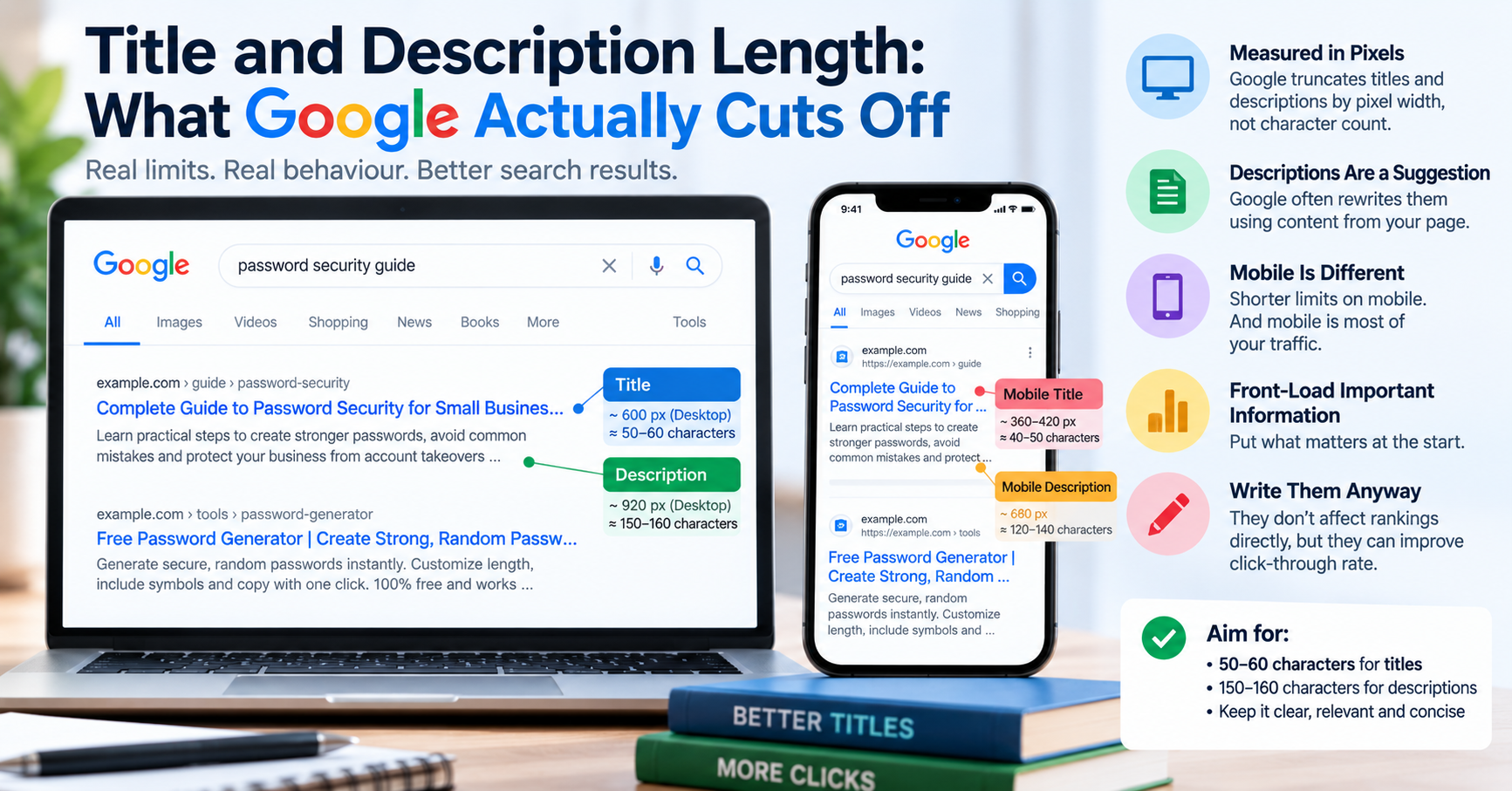
The answer is simple: Google has never measured title tags in character counts. Google measures search snippets in exact container pixel widths rendered in proportional typography. Understanding how this rendering engine works in 2026 is the key to maintaining full control over your organic search visibility.
The Physics of SERP Typography: Proportional Fonts vs. Fixed Grids
In a monospaced font (like Courier or Menlo), every single letter occupies the exact same horizontal width. The letter "i" takes up the exact same physical space on screen as the letter "W". If Google rendered search results in Courier, a fixed 60-character limit would work flawlessly.
However, Google renders Search Engine Results Pages (SERPs) using modern proportional web fonts—primarily Arial or Roboto on desktop, and native system fonts on mobile devices. In proportional typography, character widths vary wildly:
| Character Category | Example Characters | Approximate Width in Google Desktop Font | Impact on Truncation |
|---|---|---|---|
| Extra-Wide Glyphs | W, M, m, w, @, % |
13 to 17 pixels | Heavy usage burns through your pixel budget rapidly. A title of 48 characters with many capital 'W's will truncate. |
| Standard Glyphs | A, B, C, a, b, c, 0-9 |
8 to 11 pixels | Standard baseline for natural English headlines. |
| Slender Glyphs | i, l, t, j, f, I, |, :, ; |
3 to 5 pixels | Consumes minimal horizontal space. A title with slender letters can easily reach 65+ characters without truncating. |
The Exact Pixel Boundaries for 2026
To guarantee that your metadata displays completely across all devices, design your copy against Google's container boundaries:
- Title Tag Desktop Limit: The desktop SERP title link container is constrained to approximately 580 to 600 pixels (rendered at 20px font-size). Once your headline exceeds 600px, Google cuts off the text and appends an ellipsis.
- Title Tag Mobile Limit: On mobile screens, Google sometimes wraps titles onto two lines, allowing up to 650 to 680 pixels (rendered at 16px to 18px font-size). However, desktop truncation occurs first, so optimizing for the 580px desktop ceiling protects mobile users as well.
- Meta Description Pixel Limit: On desktop, Google allocates a container of approximately 960 to 990 pixels (roughly 150 to 158 characters). On mobile screens, the description container is slightly tighter: approximately 750 to 820 pixels (roughly 115 to 130 characters).
Why Google Rewrites Over 60% of Title Tags
In recent core algorithm updates, Google has become increasingly aggressive about replacing webmasters' authored title tags with automated text generated from page H1 headers, anchor text, or internal body copy. Research shows Google rewrites titles in over 60% of search impressions. Why does Google do this?
- Keyword Stuffing: Titles that read like comma-separated keyword dumps (e.g.
Shoes, Cheap Shoes, Buy Shoes Online, Discount Footwear) are almost universally rewritten by Google. - Repetitive Boilerplate Across Pages: Having hundreds of product pages where the title tag repeats the exact same brand slogan before the product name.
- Mismatched User Intent: If your title does not mention the specific topic covered on the page, Google pulls an H2 or paragraph sentence that directly answers the user's search query.
Brand Placement: Prefixing vs. Suffixing Your Brand Name
A recurring debate among SEO professionals is where to position your brand name in the title tag:
- Suffixing (Recommended for most sites):
Core Keyword Benefit - Supporting Context | Brand Name. By placing your brand at the very end, your primary topical keywords receive maximum prominence on the left edge. If screen truncation occurs on narrow mobile screens, only the brand name is cut off, while your core offering remains 100% visible. - Prefixing (Only for household brands):
Nike: Official Running Shoes & Gear. Prefixing your brand makes sense only if your brand has universal consumer recognition that drives higher CTR than the keyword itself (e.g. Apple, Amazon, Nike). For growing web properties and specialized SaaS platforms, always suffix your brand.
The Danger of Emojis and Special Characters in Snippets
Digital marketers frequently attempt to increase SERP click-through rates by adding eye-catching emojis (like 🚀, ⭐, or ⚡) into title tags and meta descriptions. While Google supports rendering standard Unicode emojis in search results, using them aggressively carries two hidden risks:
- Algorithmic Stripping: Google's quality filters automatically strip emojis if they appear spammy or irrelevant to the search query.
- Unpredictable Pixel Widths: In Google's rendering engine, an emoji can consume between 18 and 24 horizontal pixels—the equivalent of two or three capital letters. Adding three emojis to your title tag burns 60 pixels of your visual container, triggering premature text truncation.
Optimizing Snippets for AI Overviews and Voice Search
In 2026, Google's search architecture integrates generative AI summaries (Google AI Overviews) at the very top of search results. Unlike traditional search snippets that simply display your authored meta description, AI Overviews synthesize multi-sentence paragraphs extracted directly from authoritative content.
To maximize the probability that Google quotes your page in AI Overviews and voice search responses, structure your opening sentences using the Inverted Pyramid Principle: answer the primary question directly within the first 40 words using clear, declarative language. When Google's language model identifies a concise, authoritative definition at the start of your article, it cites your URL as a primary source pill, driving premium organic traffic to your platform.
The Winning Formula for High-CTR Title Tags
To write title tags that both resist automated rewriting and avoid pixel truncation, use the Front-Loaded Value Formula:
[Primary Keyword & Core Benefit] - [Supporting Detail] | [Brand Name]Example:
JSON Formatter & Validator - Fix Syntax Errors Online | TU Web Tools (542 pixels — 100% visible)
By front-loading your primary keyword in the first 35 characters, you guarantee that even if an extreme viewport truncates the end of your headline, your core offering and keyword relevance remain fully visible to searchers. You can test your live webpages against Google's exact pixel containers using our free Meta Tags Checker tool.