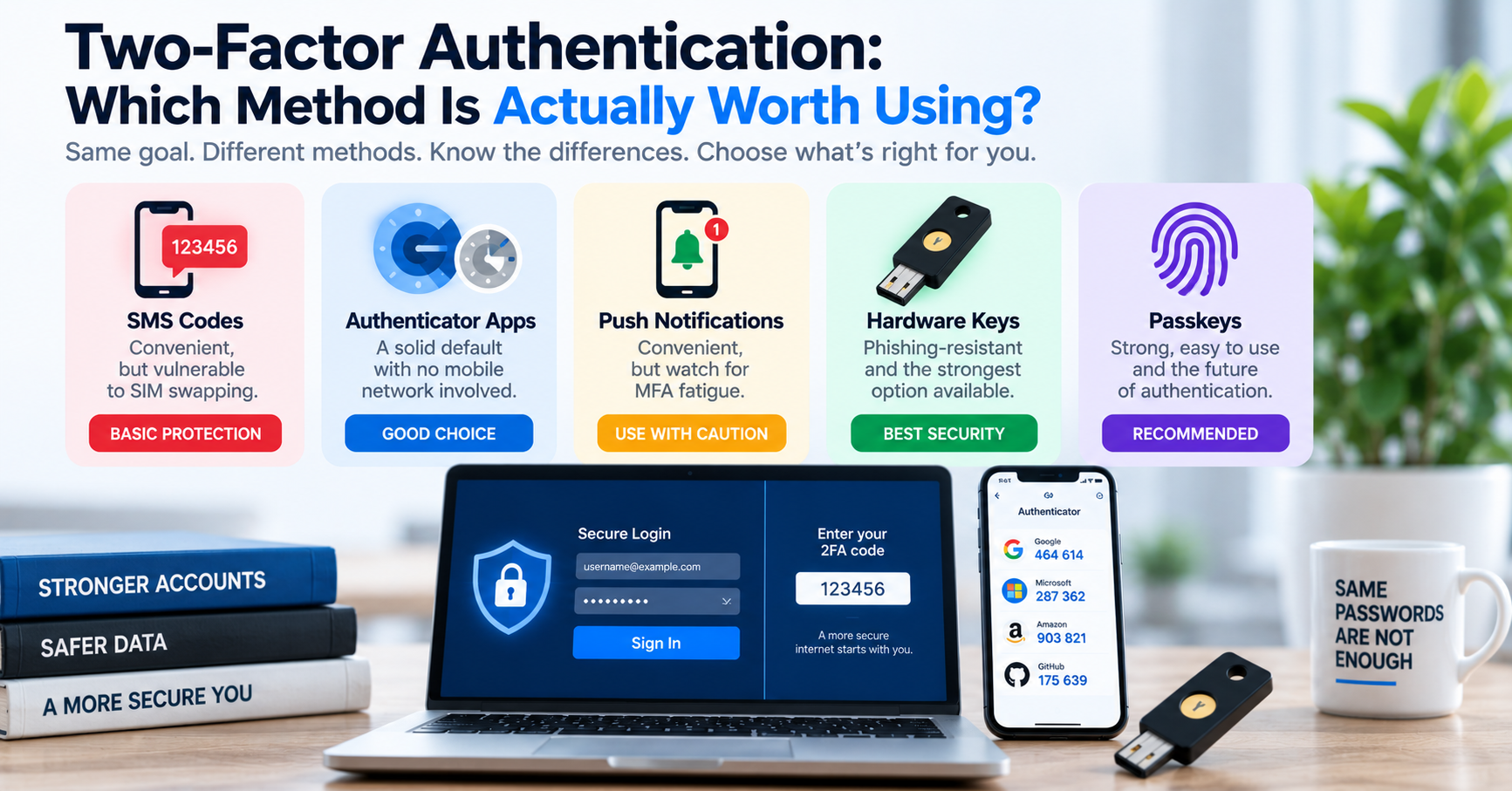
Enabling Multi-Factor Authentication (MFA or 2FA) is universally recognized by cybersecurity authorities as the single most effective action any user can take to protect their digital identity. According to research published by Google and Microsoft, adding a second authentication factor blocks over 99.9% of automated account takeovers. Even if an attacker steals your master password through a database breach or keylogger, they cannot access your account without providing the second physical factor.
However, many users assume that all 2FA methods offer identical protection. In modern cybersecurity, there is a massive gulf in security between legacy SMS verification codes and modern phishing-resistant hardware keys. Choosing the wrong method leaves you vulnerable to targeted attacks like SIM swapping and reverse-proxy phishing. Here is a definitive cryptographic comparison of the three primary 2FA methods available today.
The Hierarchy of Two-Factor Authentication Methods
| Method | Underlying Technology | Vulnerability to SIM Swapping | Vulnerability to Phishing (Man-in-the-Middle) | Ease of Use & Adoption |
|---|---|---|---|---|
| SMS / Voice Calls | Cellular SS7 carrier network routing | Critical Vulnerability: Attackers trick mobile carriers into porting your phone number. | Critical Vulnerability: Users easily enter SMS codes into fake phishing portals. | High (requires no app installation) |
| TOTP Authenticator Apps | RFC 6238 Time-Based One-Time Password (HMAC-SHA1) | Immune: Codes generate locally on your device without cellular networks. | Moderate Risk: Real-time reverse proxies (like Evilginx) can relay TOTP codes. | High (Google Authenticator, Aegis, Bitwarden) |
| FIDO2 / WebAuthn Keys | Asymmetric Public-Key Cryptography (ECDSA P-256) | Immune: Independent of phone numbers or carrier infrastructure. | 100% Phishing Immune: Hardware binds authentication cryptographically to the exact domain. | Moderate (requires USB key or Passkey device) |
Why SMS 2FA is Dangerously Insecure for Critical Accounts
SMS verification is the most widely offered 2FA method because it requires zero technical setup from consumers. However, cybersecurity agencies (including the US NIST) have deprecated SMS for sensitive systems due to two fatal weaknesses:
- SIM Swapping Attacks: An attacker gathers your phone number, full name, and birthdate from social media or data breach brokers. They contact your mobile phone carrier (posing as you) and claim their phone was lost. The carrier representative ports your phone number to a new SIM card in the attacker's possession. Within minutes, the attacker requests password resets on your Google, PayPal, and cryptocurrency accounts, intercepting the verification codes directly.
- SS7 Network Interception: The global telecommunications backbone (Signaling System 7) is decades old and lacks modern cryptographic encryption. Sophisticated criminal groups and intelligence agencies can intercept SMS text messages in transit across international telecom switches without ever touching the victim's phone.
Bottom Line: SMS 2FA is better than having no second factor at all, but it should never be used for critical email, financial, or cloud administrator accounts.
Reverse-Proxy Phishing in Action: How Evilginx Bypasses TOTP
In modern corporate penetration testing, security analysts use automated reverse-proxy frameworks like Evilginx2 to demonstrate why TOTP authenticator codes can still be phished. The attack works like this:
- The attacker sets up a proxy server on a lookalike domain (e.g.
login.microsofft.com) with a valid SSL certificate. - When a victim clicks the phishing link, the proxy fetches the real Microsoft login page and displays it to the victim.
- The victim enters their username and password. The proxy forwards these credentials to the real service and intercepts the 2FA prompt.
- The victim opens their Authenticator app and types their 6-digit TOTP code into the fake page.
- The proxy instantly relays the valid TOTP code to the real service, completes authentication, and captures the authenticated HTTP session cookie.
Even though the 6-digit code expires after 30 seconds, the stolen session cookie grants the attacker persistent access to the victim's account without triggering further password prompts. This is why enterprise organizations are aggressively migrating to FIDO2 / WebAuthn Passkeys.
How TOTP Authenticator Apps Work Mathematically (RFC 6238)
Authenticator applications (such as Aegis, Google Authenticator, or 1Password) use the Time-Based One-Time Password (TOTP) algorithm. When you scan a setup QR code, the service shares a 160-bit secret key (encoded in Base32) with your device. From that moment on, your phone and the server calculate the exact same 6-digit code without communicating over the internet:
1. Calculate current 30-second time window: \( T = \lfloor \text{Current Unix Timestamp} / 30 \rfloor \)
2. Compute cryptographic HMAC hash: \( H = \text{HMAC-SHA1}(\text{Secret Key}, T) \)
3. Extract 4 bytes via dynamic truncation and modulo \( 10^6 \) to produce the 6-digit code.
Because the secret key stays inside your device's secure enclave and the calculation relies solely on the current clock time, TOTP codes work completely offline in airplane mode.
The Gold Standard: FIDO2 / WebAuthn Hardware Security Keys
To eliminate phishing entirely, the World Wide Web Consortium (W3C) and the FIDO Alliance engineered WebAuthn. When you register a physical hardware security key (like a YubiKey) or a biometric Passkey (Touch ID / Windows Hello), your device generates an asymmetric public-private key pair. The private key never leaves the hardware security chip.
During login, your browser passes the website's exact origin domain (e.g. https://tuwebtools.com) to the security key. The key signs a cryptographic challenge using its private key and sends the signature back to the server. If an attacker tricks you into visiting a phishing site like https://tuwebto0ls.com, the browser sends the fake domain name to the hardware key. Because the domain does not match the stored credential, the key refuses to sign the authentication request. WebAuthn is the only 2FA standard mathematically immune to phishing.
Enterprise MFA Enforcement: Practical Migration Strategy
For engineering managers and system administrators tasked with upgrading an entire organization's authentication infrastructure, transitioning hundreds of employees from SMS to phishing-resistant hardware keys requires a deliberate phased rollout:
- Phase 1: Disable SMS for Privileged Roles: Immediately ban SMS verification for all engineering staff, cloud console root users, financial controllers, and executive administrators, mandating hardware security keys or enterprise password managers.
- Phase 2: Transition General Staff to Authenticator Apps: Deploy managed authenticator applications (such as Microsoft Authenticator or 1Password) with push-notification number matching to prevent MFA fatigue attacks.
- Phase 3: Roll Out FIDO2 Passkeys: Enable WebAuthn Passkeys natively across your company's Single Sign-On (SSO) identity provider (such as Okta, Google Workspace, or Azure AD), eliminating passwords entirely in favor of biometric device authentication.
Actionable Recommendations for Developers & Users
- For Daily Personal Accounts: Switch from SMS to an open-source, encrypted authenticator app (such as Aegis on Android, Raivo on iOS, or Bitwarden). Always export an encrypted backup of your TOTP seed keys to prevent lockout if you lose your phone.
- For Master Email & Cloud Infrastructure: Purchase two physical FIDO2 hardware keys (one for your keychain, one stored safely as a backup). Enforce hardware-only security on your Google, GitHub, and AWS root accounts.
- For Software Engineers Building Auth: Integrate modern WebAuthn Passkey APIs alongside TOTP (using RFC 6238 libraries), and gracefully deprecate SMS delivery for sensitive account actions.