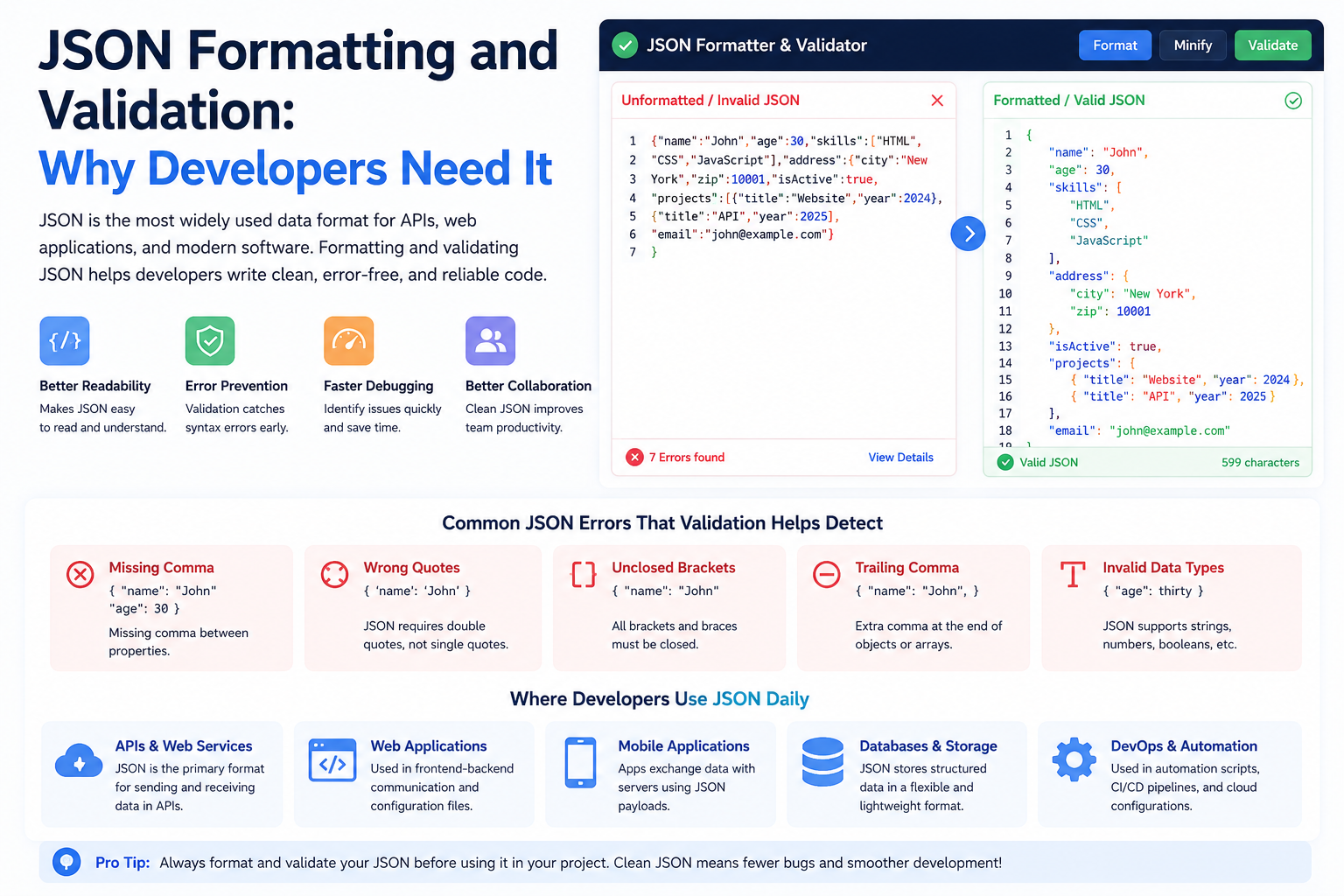
In modern software engineering, JSON (JavaScript Object Notation) is the undisputed lingua franca of data exchange. Every REST API, GraphQL query response, NoSQL database document (such as MongoDB BSON or CouchDB), and configuration file (from package.json to tsconfig.json) communicates using JSON. It is lightweight, text-based, and natively supported across virtually every modern programming language.
Yet, software developers waste countless hours troubleshooting mysterious JSON parsing errors. An API endpoint returns an unhandled 500 error because of an extra comma. A database synchronization job silently corrupts 64-bit integer IDs. Or an automated deployment pipeline fails because an engineer wrapped a property in single quotes. Why are JSON parsers so ruthlessly strict, and how can developers format and validate payloads effectively? Here is an engineering guide to mastering JSON compliance under RFC 8259.
The Strict Grammar of RFC 8259: The Top Four Traps
Many junior developers assume that because JSON originated from JavaScript object literal syntax, standard JavaScript rules apply. In reality, the formal JSON standard (standardized by the IETF as RFC 8259) is vastly more restrictive than JavaScript:
| Syntax Rule | Valid in Modern JavaScript | Valid in Standard JSON (RFC 8259) | Production Parser Behavior |
|---|---|---|---|
| Trailing Commas | Permitted: [1, 2, 3,] |
Strictly Forbidden: [1, 2, 3] |
Throws fatal SyntaxError: Unexpected token , in JSON at position... |
| Quotation Marks | Single quotes, double quotes, backticks | Double Quotes Only: "key": "value" |
Single quotes invalidate the entire document immediately. |
| Unquoted Keys | Permitted: { status: "ok" } |
Keys Must Be Quoted: { "status": "ok" } |
Fails parsing; unquoted keys are treated as illegal syntax tokens. |
| Comments | // Inline and /* Block */ |
No Comments Allowed: Zero comment support | Comments trigger fatal unexpected token errors. |
The 64-Bit Integer Precision Trap: Why Snowflake IDs Break
One of the most dangerous, silent bugs in web architecture occurs when passing large 64-bit integers (like Twitter/X Snowflake IDs, Discord message IDs, or database BIGINT keys) into JSON parsers:
// In your backend database:
const originalId = 1589201948291048291n; // 64-bit integer

// When parsed by standard JSON.parse() in a browser:
const parsed = JSON.parse('{"id": 1589201948291048291}');
console.log(parsed.id);
// Output: 1589201948291048200 (Corrupted! Last digits lost!)
Why did this data corruption happen? According to IEEE 754 standards, standard JavaScript numbers are double-precision 64-bit floating-point numbers. The maximum safe integer that can be represented without loss of precision is Number.MAX_SAFE_INTEGER: \( 2^{53} - 1 = 9,007,199,254,740,991 \). Any integer larger than 9 quadrillion loses its least significant digits when parsed by standard JSON parsers!
The Architectural Rule: Always serialize 64-bit integer IDs as string values in your API payloads: { "id": "1589201948291048291" }. This guarantees exact, lossless precision across all client languages.
Custom JSON Serialization: Handling BigInt, Date, and Map Types
Because JSON natively supports only six data types (string, number, boolean, null, object, and array), serializing advanced modern JavaScript data structures requires custom replacer and reviver functions:
// Custom serializer handling BigInt and Date:
function customStringify(obj) {
  return JSON.stringify(obj, (key, value) => {
    if (typeof value === 'bigint') {
      return value.toString() + 'n'; // Preserve BigInt as string with suffix
    }
    if (value instanceof Map) {
      return Object.fromEntries(value); // Convert ES6 Map to plain object
    }
    return value;
  }, 2);
}

// Custom deserializer restoring BigInt:
function customParse(jsonString) {
  return JSON.parse(jsonString, (key, value) => {
    if (typeof value === 'string' && /^\d+n$/.test(value)) {
      return BigInt(value.slice(0, -1)); // Restore native BigInt
    }
    return value;
  });
}
Circular Reference Traps in JavaScript Object Graphs
In full-stack Node.js development, attempting to serialize an object that contains bidirectional relationships (such as an ORM entity pointing to a parent model that points back to its children) will trigger a fatal runtime exception:
const parent = { name: "Engineering" };
const child = { title: "Lead Architect", department: parent };
parent.lead = child; // Creates circular reference!

JSON.stringify(parent);
// Uncaught TypeError: Converting circular structure to JSON
Standard JSON cannot represent circular graphs because JSON is strictly an acyclic tree hierarchy. Before serializing complex objects, developers must either prune circular references using a custom replacer function, use a WeakSet to track visited references, or utilize graph-aware libraries like flatted.
Validating API Contracts with JSON Schema Draft 2020-12
In microservices architectures, validating that incoming JSON payloads adhere to contractual specifications prevents silent downstream crashes. JSON Schema (RFC Draft 2020-12) provides a declarative standard for defining expected types, mandatory properties, and numerical ranges:
{
  "$schema": "https://json-schema.org/draft/2020-12/schema",
  "type": "object",
  "required": ["userId", "email", "roles"],
  "properties": {
    "userId": { "type": "string", "format": "uuid" },
    "email": { "type": "string", "format": "email" },
    "roles": { "type": "array", "minItems": 1, "items": { "type": "string" } }
  }
}
Comparing JSON, JSON5, and Protocol Buffers
| Format | Human Readability | Comments & Trailing Commas | Wire Overhead | Primary Use Case |
|---|---|---|---|---|
| Standard JSON | High | Forbidden (RFC 8259) | Medium (Text strings) | Public REST APIs, browser storage, config files. |
| JSON5 | Highest | Fully Supported | Medium (Text strings) | Developer-edited configurations (e.g. tsconfig, babelrc). |
| Protobuf (Google) | Low (Binary format) | In .proto schema only | Lowest (Compact binary) | High-throughput internal gRPC microservices. |
Sorting Keys Deterministically for Clean Git Diffs
When multiple developers work on shared JSON configuration files (such as package.json, translation dictionary files, or OpenAPI schema definitions), different text editors and serialization libraries may output object keys in arbitrary order. A simple one-line modification can produce a 50-line Git diff simply because the keys shifted order, making pull request code reviews painful.
Our online JSON Formatter & Validator includes an optional Alphabetical Key Sorting feature. When enabled, it traverses all nested objects and orders their keys alphabetically. Formatting your JSON configuration files through this sorting filter before committing guarantees clean, deterministic Git diffs.
Terminal Power Recipes: Validating JSON with jq and Python
For systems engineers and DevOps practitioners working inside CI/CD pipelines, validating JSON files automatically before running builds prevents broken deployments. Two universal command-line utilities make this effortless:
# 1. Validate and pretty-print JSON using jq in Linux / macOS
jq . config.json > pretty.json

# 2. Check JSON validity in a CI/CD bash script (returns exit code 0 on valid, non-zero on error):
if jq -e . payload.json > /dev/null 2>&1; then
    echo "JSON syntax is valid."
else
    echo "FATAL: Invalid JSON syntax detected!" >&2
    exit 1
fi

# 3. Built-in Python one-liner (works on any server with Python 3 installed):
python3 -m json.tool input.json pretty_output.json --sort-keys
The Python json.tool module provides built-in validation and key sorting without requiring third-party package installations, making it an ideal pre-commit Git hook check across engineering teams.
Client-Side Privacy: Debugging Production JSON Safely
When debugging live production incidents, engineers frequently copy raw API error responses containing sensitive user data, internal IP addresses, and database schema traces. Pasting that data into online formatting sites that transmit payloads to remote servers is a serious security violation.
At TU Web Tools, our JSON Formatter & Validator runs 100% locally on your machine using client-side JavaScript. No payload bytes ever leave your device, ensuring complete confidentiality for proprietary enterprise data.