Every software engineer, system administrator, and data analyst uses browser-based utility tools daily. Whether you are formatting an unreadable JSON payload from a microservice, base64-decoding an OAuth access token, converting an SQL seed list into comma-delimited values, or minifying a CSS stylesheet before deployment, web utilities provide instant convenience without launching heavyweight IDE extensions or writing throwaway scripts.
However, that convenience carries substantial corporate security risks. In 2023, cybersecurity researchers discovered multiple popular online formatting websites that were silently logging every piece of text pasted into their forms. Unsuspecting developers had pasted database connection strings containing production passwords, proprietary source code algorithms, JWT signing secrets, and medical customer records directly into third-party databases. Once data is transmitted over the wire to an unknown remote server, your company has suffered an unmonitored data breach.
At TU Web Tools, we architected our platform around a zero-knowledge, client-side-first engineering philosophy. Here is the exact audit framework my development experience uses to evaluate any online utility before trusting it with sensitive company data.
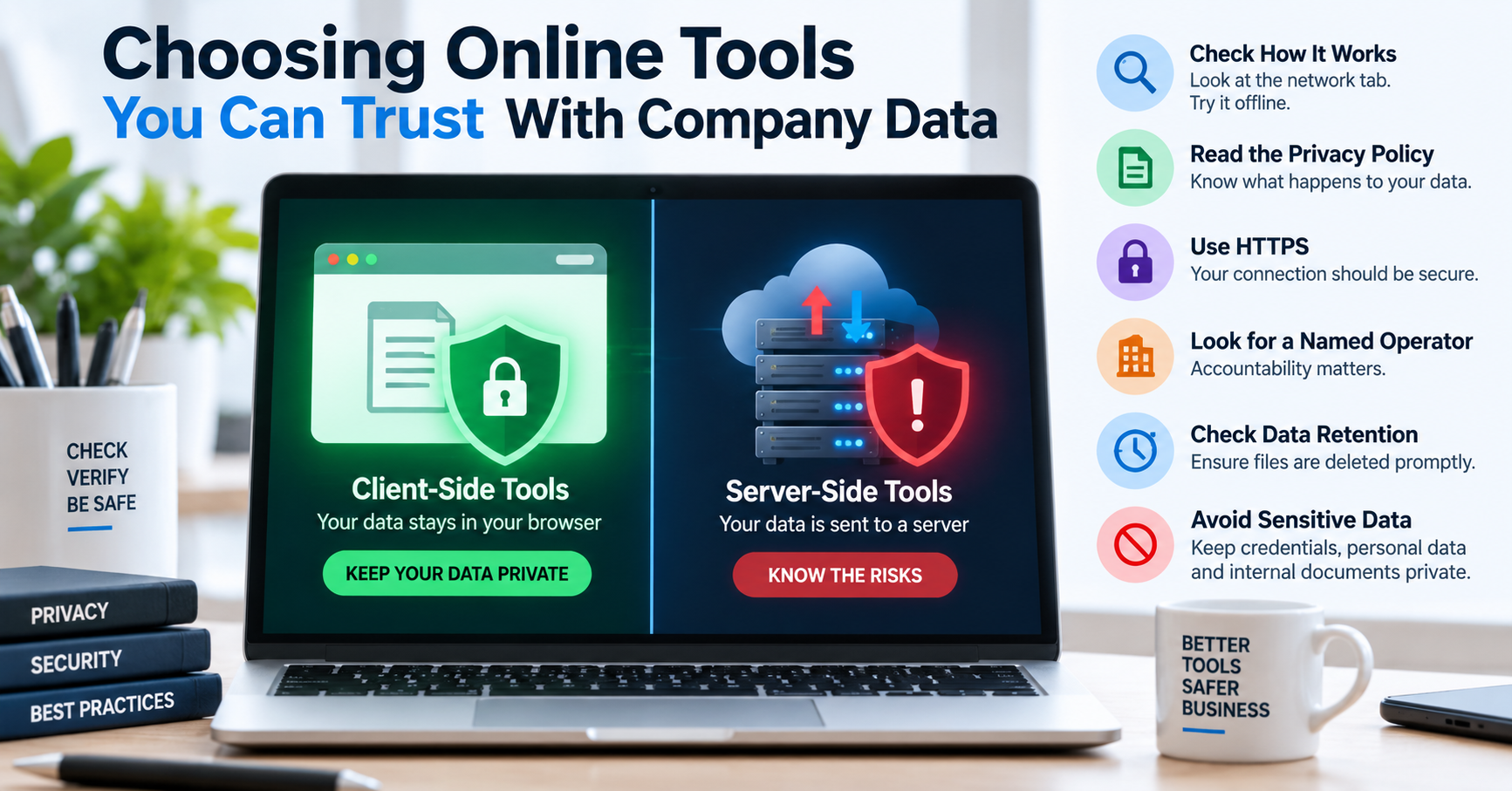
The Fundamental Architecture: Client-Side vs. Server-Side Execution
Online developer tools generally fall into two architectural categories:
| Feature | Server-Side Processing (High Risk) | Client-Side Processing (Zero Knowledge) |
|---|---|---|
| Execution Location | Remote backend server (PHP, Python, Node, Go) | Local browser engine (JavaScript V8 / WebAssembly) |
| Network Transmission | Transmits raw user text via HTTP POST requests | Zero payload bytes leave the user's computer |
| Server Logging Risk | High: Web server access logs, Redis caches, error logs | None: No server receives or stores the data |
| Compliance Status | Requires Data Processing Agreements (DPA) under GDPR/HIPAA | Inherently compliant because data residency never changes |
How to Audit an Online Tool in 60 Seconds Using Chrome DevTools
You don't have to take a website's "100% Private" marketing claim at face value. You can prove whether a tool is truly running client-side using your browser's built-in developer tools:
- Open Developer Tools: Press
F12(orCtrl + Shift + Ion Windows /Cmd + Option + Ion macOS) and navigate to the Network tab. - Filter for Network Activity: Click the Fetch/XHR filter button at the top of the Network panel to isolate dynamic API calls from static CSS or font files.
- Paste Sample Text and Execute: Paste a harmless string (e.g.
{"test": "audit_token"}) into the tool's input box and click the action button (e.g. Format, Minify, or Encode). - Analyze the Network Stream:
- If zero new network requests appear: The tool executed locally in your browser's memory using JavaScript. The data never left your device.
- If a POST or PUT request appears: Click on the request and inspect the Payload / Request Body tab. If you see your pasted text being transmitted to a backend URL (e.g.
/api/v1/format-json), that service is logging or processing your data remotely on foreign servers. Stop using it for confidential work immediately.
- Test Offline Functionality: Disconnect your computer from Wi-Fi or enable "Offline" mode in the DevTools Network throttling dropdown. A genuine client-side utility will continue formatting, minifying, and encoding text without any internet connection.
The Hidden Trap of Analytics Pixels and Session Recorders
Even if an online tool processes calculations using client-side JavaScript, third-party analytics integrations can silently capture your confidential text behind the scenes:
- Session Replay Scripts: Many ad-supported websites install behavioral analytics tools like Hotjar, Microsoft Clarity, FullStory, or LogRocket. These libraries record DOM mutations, mouse movements, and input changes to reconstruct video replays of user sessions. Unless the website developers explicitly mark text inputs with strict privacy masking tags (like
data-clarity-mask="true"orfs-mask), every single character you paste into the textarea is transmitted to the analytics provider's cloud servers! - Uncontrolled Tag Managers: If a utility website loads Google Tag Manager (GTM) or external advertising pixels without strict sanitization, marketing scripts can scrape form inputs or URL parameters, inadvertently transmitting internal API keys or customer emails to third-party ad exchanges.
- Error Monitoring Telemetry: Automated error monitoring tools (such as Sentry or Bugsnag) automatically capture application state whenever a JavaScript error occurs. If you paste invalid JSON into a poorly configured formatter, the resulting syntax error object may bundle your entire proprietary JSON string into the error payload and upload it to the service's monitoring dashboard.
Enterprise Case Study: The Accidental Source Code Leak
In early 2023, a junior software engineer working for a major financial fintech startup attempted to debug a slow SQL query. The query contained a nested subquery referencing proprietary risk-scoring algorithms and live customer account balances. To format the SQL query nicely, the engineer Googled "SQL Formatter" and clicked the top sponsored result.
The formatter executed on a remote server that automatically archived all submitted queries into a publicly searchable "Recent SQL Snippets" feed to boost its SEO footprint. Within four hours, an automated security bot indexed the page. The fintech startup was forced to revoke database credentials, file mandatory breach notifications with financial regulators, and perform an emergency audit of all developer tooling. This entire disaster could have been prevented had the engineer followed the simple 60-second DevTools network inspection protocol described above.
How to Sandbox Web Utilities in Corporate Environments
If your development team must use web-based utilities for daily productivity, implement these corporate security policies:
- Use Ephemeral Browser Profiles: Open developer tools in a dedicated, isolated browser profile with third-party cookies disabled, ad-blockers enabled, and browser extensions restricted.
- Mandate Client-Side Verified Platforms: Maintain an internal company whitelist of approved developer utilities (such as TU Web Tools) that have been formally audited and verified for zero-knowledge, local-only execution.
- Inspect Content Security Policies (CSP): A trustworthy developer site should implement a strict
Content-Security-PolicyHTTP header that restricts where data can be transmitted, preventing unauthorized outbound network calls.
The TU Web Tools Engineering Guarantee
When I engineered the suite of online utilities on TU Web Tools—from the JSON Formatter and Base64 Encoder to the Password Strength Checker and QR Code Reader—I made a deliberate architectural commitment: 100% client-side execution. The platform utilizes modern browser APIs (including the Web Crypto API, HTML5 Canvas, and modern ECMAScript text segmenters) so that computation happens within your local CPU cores. Your internal database IDs, authentication tokens, customer email lists, and private scripts remain strictly inside your browser session—cleared the moment you close or refresh the tab.